
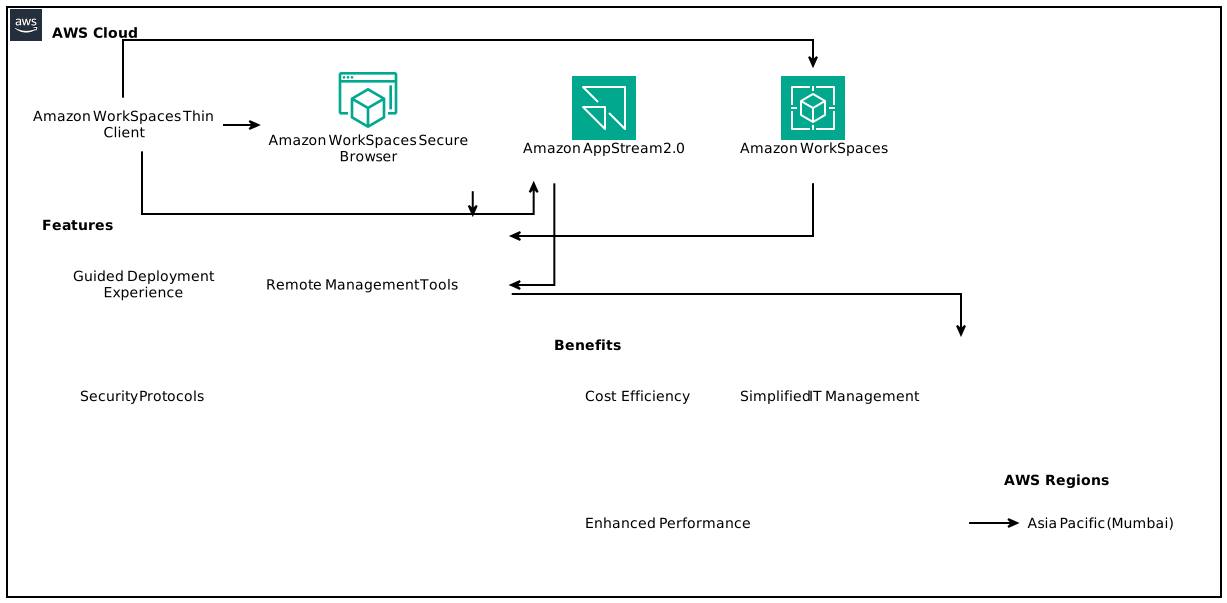
The Amazon WorkSpaces Thin Client is now available to purchase in India, a pivotal development for organizations looking to streamline their virtual desktop infrastructure. This guide will delve into the functionalities, benefits, deployment, security features, and overall impact of integrating the WorkSpaces Thin Client into your organization’s digital ecosystem.
Table of Contents
- Introduction to Amazon WorkSpaces Thin Client
- Understanding Thin Clients
- Key Features of WorkSpaces Thin Client
- Benefits of Using WorkSpaces Thin Client
- How to Deploy Amazon WorkSpaces Thin Client
- Security Advantages of WorkSpaces Thin Client
- Pricing and Availability in India
- AWS Regions and Service Access
- Comparison with Other Solutions
- Real-World Use Cases
- Conclusion: The Future of Work with Amazon WorkSpaces
Introduction to Amazon WorkSpaces Thin Client 
Amazon WorkSpaces Thin Client represents a significant step towards optimizing virtual desktop infrastructure, particularly in the growing Indian market. This low-cost end-user device is designed to connect seamlessly to various Amazon services like Amazon WorkSpaces, Amazon WorkSpaces Secure Browser, and Amazon AppStream 2.0, providing organizations with a comprehensive solution to manage remote workforces effectively.
The availability of WorkSpaces Thin Client in India positions it as a compelling option for businesses aiming to enhance employee productivity while keeping IT expenditures manageable. With the guided deployment experience, users can get started quickly, promoting an efficient workflow that enhances overall organizational performance.
Understanding Thin Clients 
Definition
A thin client is a lightweight computing device that relies heavily on a remote server for processing and storage. Unlike traditional PCs that operate independently with local software, thin clients typically connect to virtual desktops hosted on servers.
Evolution of Thin Clients
The idea of thin clients has evolved significantly over the years, primarily due to advancements in cloud computing and virtual desktop infrastructure (VDI). Organizations are increasingly moving towards cloud solutions to reduce hardware costs and improve data security.
The Role of Cloud Computing
Cloud technology is a driving force behind the demand for thin clients, as organizations seek to realize the benefits of centralized data management and operational flexibility.
Key Features of WorkSpaces Thin Client 
Guided Deployment Experience
The WorkSpaces Thin Client comes equipped with an intuitive setup process. Users can get their devices up and running within minutes, ensuring minimal downtime and unwavering productivity.
Wide Compatibility
The device provides compatibility with various AWS applications, enabling users to access not only Amazon WorkSpaces but also Amazon AppStream 2.0 for application streaming.
Remote Management Tools
IT administrators wield significant control through remote management capabilities, including inventory management, patch deployment, and device access control.
Benefits of Using WorkSpaces Thin Client 
Cost Efficiency
One of the most significant advantages of the WorkSpaces Thin Client is its cost-effectiveness. Reduced infrastructure and maintenance costs translate to savings for organizations.
Simplified IT Management
The centralized management available through the WorkSpaces Thin Client allows IT departments to minimize their overhead while maintaining high security and performance standards.
Enhanced Performance
By offloading processing to the cloud, businesses can leverage the power of AWS infrastructure, resulting in superior performance, especially for resource-intensive applications.
How to Deploy Amazon WorkSpaces Thin Client 
Step-by-Step Deployment Guide
- Initial Setup: Unbox the WorkSpaces Thin Client and connect it to a power source and network.
- Guided Configuration: Follow the on-screen instructions to connect with your Amazon WorkSpaces account.
- Peripheral Connection: Link devices like monitors, keyboards, and mice.
- Login: Utilize your AWS credentials to access virtual desktops.
Post-Deployment Tips
- Regularly update the thin client for optimal performance.
- Utilize monitoring tools to oversee both client and server performance.
Security Advantages of WorkSpaces Thin Client 
File Upload/Download Limitations
The WorkSpaces Thin Client enhances security by restricting file uploads and downloads, thereby minimizing data breach risks.
Device Trust with Secure Chips
With device trust enabled through secure chip technology, unauthorized access is significantly curtailed.
Importance of Centralized Security Protocols
Centralized security management allows for uniform resource allocation and enhanced security measures.
Pricing and Availability in India 
Cost Structure
The pricing model is competitive and is structured to appeal to both small businesses and large enterprises. Specific pricing details can be found on Amazon Business, with options tailored for different organizational needs.
Purchasing Options
Organizations can purchase the WorkSpaces Thin Client directly through Amazon Business in India, facilitating a smoother procurement process.
AWS Regions and Service Access 
Overview of AWS Regions
The WorkSpaces Thin Client service is accessible in multiple AWS regions, including:
- US East (N. Virginia)
- US West (Oregon)
- Asia Pacific (Mumbai)
- Canada (Central)
- Europe (Frankfurt, Ireland, London)
Accessing Services in India
Indian organizations benefit from proximity to the Asia Pacific (Mumbai) region, allowing for lower latency and faster access to services.
Comparison with Other Solutions 
WorkSpaces Thin Client vs. Traditional PCs
Cost: WorkSpaces Thin Client is significantly less expensive in terms of initial investment and ongoing maintenance.
Management: With centralized management, the WorkSpaces Thin Client simplifies IT protocols compared to traditional PCs, which require individual oversight.
Other Thin Client Solutions
While there are other thin client solutions available, Amazon’s offering stands out due to its seamless integration with AWS services, competitive pricing, and robust security features.
Real-World Use Cases 
Use Case 1: Remote Work
Many organizations have shifted to remote work policies. The WorkSpaces Thin Client offers a practical solution to maintain productivity without the need for extensive IT resources.
Use Case 2: Educational Institutes
Educational institutions can leverage the benefits of thin clients to provide students with access to learning resources without investing heavily in infrastructure.
Use Case 3: Large Corporations
Large corporations can utilize the WorkSpaces Thin Client for its scalability and security, managing thousands of devices remotely without increasing their IT footprint.
Conclusion: The Future of Work with Amazon WorkSpaces 
As the demand for efficient, cost-effective virtual desktop solutions continues to grow, the Amazon WorkSpaces Thin Client presents organizations in India with a formidable tool for optimizing their operational strategies. With its focus on security, ease of deployment, and overall cost management, the WorkSpaces Thin Client stands out as a critical component of future business success.
Focus Keyphrase: Amazon WorkSpaces Thin Client