
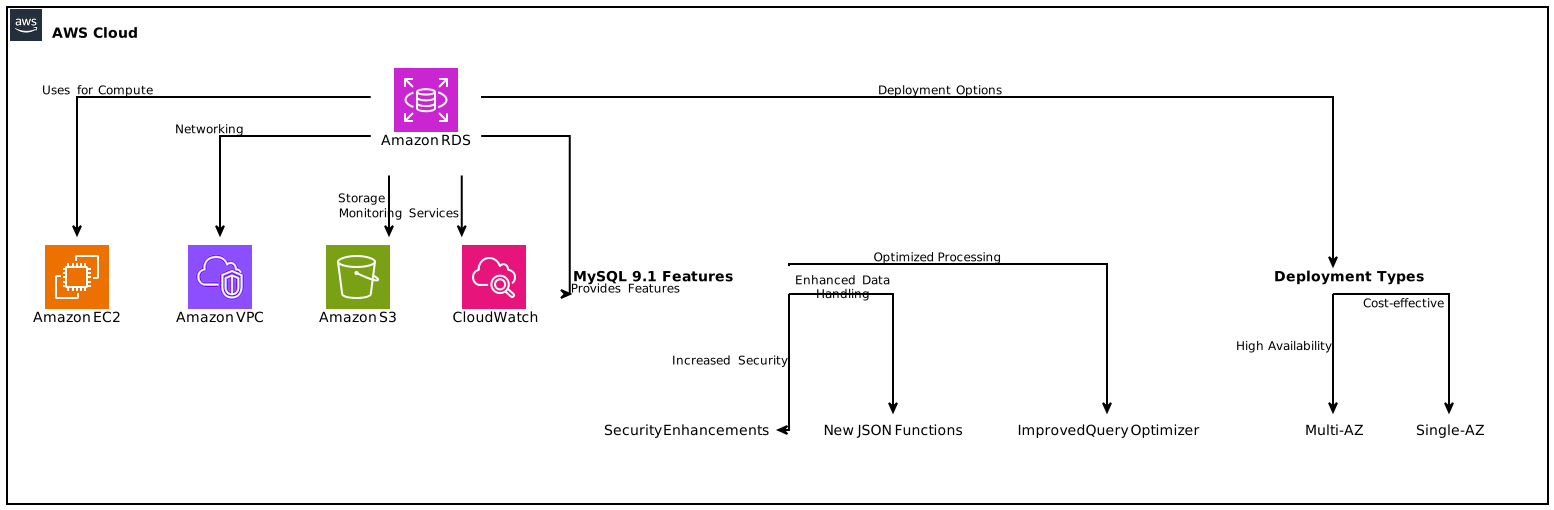
In the world of cloud computing and database management, innovations are continuous and fast-paced. As of December 18, 2024, Amazon RDS for MySQL supports Innovation Release version 9.1 in the Amazon RDS Database Preview Environment, offering users an opportunity to evaluate and deploy this latest iteration. In this comprehensive guide, we will explore the key features, deployment options, and operational advantages of using Amazon RDS for MySQL 9.1, as well as delve into broader topics surrounding MySQL and RDS technologies.
Table of Contents
- Introduction to Amazon RDS for MySQL
- What’s New in MySQL 9.1?
- Benefits of Using Amazon RDS
- 3.1 Fully Managed Database
- 3.2 High Availability with AZ Deployments
- 3.3 Scalability and Performance
- Deploying MySQL 9.1 in RDS Database Preview
- 4.1 Single-AZ vs Multi-AZ Deployments
- 4.2 Setting Up Your Database Instance
- Managing Your RDS Instance
- 5.1 Automated Backups and Snapshots
- 5.2 Monitoring and Performance Tuning
- Cost Structure and Considerations
- Best Practices for Amazon RDS
- Conclusion: Embracing Innovation with RDS 9.1
1. Introduction to Amazon RDS for MySQL {#introduction}
Amazon Relational Database Service (RDS) for MySQL provides a robust platform for running MySQL databases without the complexity of hardware setup, maintenance, and scalability issues. The recent introduction of Amazon RDS for MySQL supporting Innovation Release version 9.1 in the Amazon RDS Database Preview Environment represents a significant leap forward for users wishing to harness the latest features of MySQL while enjoying the benefits of AWS’s managed database services.
In this guide, we will thoroughly review what MySQL 9.1 offers, its deployment features, and how Amazon RDS enhances the MySQL experience.
2. What’s New in MySQL 9.1? {#whats-new-in-mysql-9-1}
Enhanced Features and Improvements
MySQL 9.1 brings several new capabilities and performance enhancements:
- Improved Query Optimizer: Advanced optimizations allow for faster queries and better execution plans.
- New JSON Functions: Continued improvements make handling JSON data types simpler and more efficient.
- Security Enhancements: Strengthened security protocols and features bolster protection for sensitive data.
- Performance Schema Enhancements: Improved visibility into database performance metrics helps in diagnosing issues quickly.
- Bug Fixes: Version 9.1 includes numerous bug fixes from previous releases.
These changes are just a glimpse. For detailed information, you should always refer to the official MySQL 9.1 release notes.
3. Benefits of Using Amazon RDS {#benefits-of-using-amazon-rds}
3.1 Fully Managed Database {#fully-managed-database}
A standout feature of Amazon RDS is its fully managed nature. This means:
- Automatic Software Patching: AWS manages database software patching without any user intervention.
- Effortless Scaling: Scaling instances up or down can be accomplished with a click of a button, adapting to your workload as necessary.
3.2 High Availability with AZ Deployments {#high-availability-with-az-deployments}
Amazon RDS supports both Single-AZ and Multi-AZ deployments:
- Single-AZ Deployment: Offers cost-saving advantages but may be less resilient.
- Multi-AZ Deployment: Automatic failover capability enhances reliability, as data is replicated across multiple availability zones.
3.3 Scalability and Performance {#scalability-and-performance}
Amazon RDS enables dynamic scaling with minimal downtime. Users can choose the instance types that match their workloads and adjust storage type and capacity as needed.
4. Deploying MySQL 9.1 in RDS Database Preview {#deploying-mysql-9-1-in-rds-database-preview}
4.1 Single-AZ vs Multi-AZ Deployments {#single-az-vs-multi-az-deployments}
Understanding when to use Single-AZ versus Multi-AZ setups is crucial for cost-efficiency as well as availability.
- Use Single-AZ for test environments or scenarios where downtime can be tolerated.
- Opt for Multi-AZ for production workloads requiring high availability and failover capability.
4.2 Setting Up Your Database Instance {#setting-up-your-database-instance}
To set up a new Amazon RDS instance utilizing MySQL 9.1:
- Log into AWS Management Console: Navigate to the RDS section.
- Select the MySQL version: Choose MySQL 9.1 from the available versions for your instance.
- Configure your instance settings: Specify instance class, storage, and networking preferences.
- Launch the instance: Complete the setup process and monitor deployment progress.
5. Managing Your RDS Instance {#managing-your-rds-instance}
5.1 Automated Backups and Snapshots {#automated-backups-and-snapshots}
AWS RDS provides automated backup capabilities, making data recovery reliable and straightforward:
- Automated Backups: Enabled by default, allowing point-in-time recovery.
- Manually Created Snapshots: Users can create custom snapshots that won’t expire or get deleted automatically.
5.2 Monitoring and Performance Tuning {#monitoring-and-performance-tuning}
Amazon RDS provides monitoring tools such as Amazon CloudWatch to visualize system performance:
- Performance Insights: Offers advanced database performance metrics to assist in identifying bottlenecks.
- Enhanced Monitoring: Provides real-time insights into the operating system metrics of the RDS instance.
6. Cost Structure and Considerations {#cost-structure-and-considerations}
When leveraging Amazon RDS, understanding the cost structure is paramount. Consider the following factors:
- Instance Pricing: RDS instances in the preview environment carry the same pricing structure as production instances in specific regions.
- Storage Pricing: Additional costs for storage and backups beyond the base instance charges.
- Data Transfer Costs: Charges may apply for data transfer, especially in cross-region scenarios.
7. Best Practices for Amazon RDS {#best-practices-for-amazon-rds}
To maximize the benefits of Amazon RDS, consider implementing the following best practices:
- Regularly Monitor Performance: Utilize CloudWatch and Performance Insights.
- Employ Multi-AZ for Production: Ensure high availability for mission-critical applications.
- Automate Updates: Enable automated backups and maintenance windows for software updates.
8. Conclusion: Embracing Innovation with RDS 9.1 {#conclusion}
As we delve into the capabilities of Amazon RDS for MySQL, the support for Innovation Release version 9.1 is significant. This release enhances SQL performance, improves security, and adds new functionalities, making it a compelling choice for developers and organizations looking to modernize their database architecture. By utilizing AWS’s managed services, teams can focus on innovation, knowing their databases are hosted on a reliable and scalable infrastructure.
In summary, the adoption of Amazon RDS for MySQL 9.1 not only streamlines database management tasks, but it also empowers companies to focus on their core business strategies while leveraging cutting-edge technology.
Focus Keyphrase: Amazon RDS for MySQL 9.1