
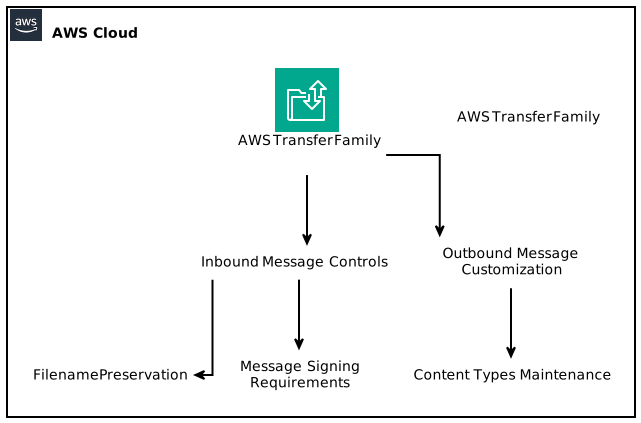
AWS Transfer Family provides additional controls over AS2 message attributes, making it easier to manage your business-to-business (B2B) messaging needs. With the recent updates, you can adjust inbound and outbound Applicability Statement 2 (AS2) messages for improved compatibility with a wider range of partner implementations, enhancing the security and efficiency of your data exchanges.
Table of Contents
- Introduction to AS2 and AWS Transfer Family
- Overview of AS2 Protocol
- Importance of AS2 in B2B Communications
- Common Use Cases of AS2
- AWS Transfer Family Features
- Core Functions of AWS Transfer Family
- Interoperability with AS2
- New Configuration Options for AS2 Messages
- Inbound Message Controls
- Outbound Message Customization
- Understanding AS2 Message Attributes
- What are AS2 Message Attributes?
- Default vs Custom Attributes
- Security Enhancements
- Signing Requirements for Inbound Messages
- Maintaining Content Types for Outbound Messages
- Benefits of Enhanced AS2 Message Control
- Implementing AS2 Configurations Using AWS Transfer Family
- Step-by-Step Guide to Configuration
- Using AWS CloudFormation Templates
- Self-Paced Workshops and Learning Resources
- Troubleshooting Common Issues
- Best Practices for AS2 Messaging
- Conclusion
Introduction to AS2 and AWS Transfer Family
The AWS Transfer Family is a versatile managed file transfer service that supports multiple protocols, including AS2, SFTP, FTP, and FTPS, enabling you to securely exchange files with trading partners. With AWS Transfer Family’s recent updates, you now have greater control over AS2 message attributes, allowing for better interoperability and adherence to security policies. This guide will explore how these controls work and the benefits they provide.
Overview of AS2 Protocol
Importance of AS2 in B2B Communications
AS2 has become a critical protocol for businesses looking to streamline their electronic data interchange (EDI) processes. With its ability to transfer data securely over the internet, AS2 offers a plethora of benefits, such as reliable data delivery, enhanced security, and compliance with industry standards.
Common Use Cases of AS2
AS2 is widely used across various industries, including:
– Healthcare: For transmitting patient records, billing information, and other sensitive data.
– Retail: To manage inventory levels, supplier invoices, and purchase orders.
– Supply Chain: For coordinating shipments and inventory management.
– Logistics: To communicate real-time tracking information and carrier updates.
AWS Transfer Family Features
Core Functions of AWS Transfer Family
AWS Transfer Family is designed to facilitate secure file transfer between diverse systems and platforms. Its core features include:
– Simplified management of file transfers.
– Integration with AWS storage solutions like Amazon S3.
– Easy configuration and deployment.
Interoperability with AS2
One of the standout attributes of AWS Transfer Family is its AS2 support, which allows businesses to leverage AWS cloud infrastructure for their EDI needs while ensuring compliance with AS2 standards. This makes it a preferred choice for enterprises that need reliable and secure B2B communications.
New Configuration Options for AS2 Messages
With the recent update, AWS Transfer Family introduces new configuration options that give you more control over AS2 message attributes for both incoming and outgoing messages.
Inbound Message Controls
For inbound AS2 messages:
– Filename Preservation: You can now preserve the original filenames of files received from trading partners, ensuring consistency and reducing possible errors in file handling.
– Message Signing Requirement Enforcement: You can enforce specific signing requirements, allowing only signed messages to be accepted. This adds a robust layer of security to your data exchanges.
Outbound Message Customization
For outbound AS2 messages:
– Maintaining Content Types: The service now enables you to maintain the content types associated with your AS2 payloads stored in Amazon S3. This customization allows you to override the default content type of the service, ensuring that your trading partners receive the data exactly as intended.
Understanding AS2 Message Attributes
What are AS2 Message Attributes?
AS2 message attributes are essential metadata elements that provide information about the message being sent or received. These attributes can include:
– Message type
– Content type
– File name
– Message ID
– Security attributes
Default vs Custom Attributes
When using AWS Transfer Family, you can work with both default AS2 message attributes and custom attributes. The ability to define these attributes according to your business requirements ensures seamless communication with your trading partners and compliance with industry standards.
Security Enhancements
Signing Requirements for Inbound Messages
The enforcement of signing requirements helps ensure that only verified messages are accepted, which is crucial for preventing data breaches and maintaining compliance with regulatory standards like HIPAA or GDPR.
Maintaining Content Types for Outbound Messages
By controlling the content types of outbound messages, you can ensure that the receiving systems correctly interpret the data, reducing the chances of errors during transmission.
Benefits of Enhanced AS2 Message Control
The enhanced controls over AS2 message attributes in AWS Transfer Family provide several key benefits:
1. Improved Interoperability: Businesses can connect with a more extensive range of trading partners without compatibility issues.
2. Greater Security: The ability to enforce signing requirements elevates the overall integrity of data exchanges.
3. Better Compliance: Organizations can adhere to industry regulations more effectively, safeguarding sensitive data.
4. Reduced Operational Overhead: Simplifying message attribute management means less manual intervention in your data processes.
Implementing AS2 Configurations Using AWS Transfer Family
Setting up the new AS2 configurations is straightforward. Below, we’ll provide a step-by-step guide to help you get started.
Step-by-Step Guide to Configuration
- Access AWS Management Console: Log in to your AWS account and navigate to the Transfer Family console.
- Select AS2 Option: Choose the AS2 transfer option to access its specific settings.
- Configure Inbound Controls: Set up filename retention and define your signing requirements for incoming messages.
- Configure Outbound Settings: Customize the content types for your AS2 payloads and ensure they align with your trading partners’ requirements.
- Test Your Configuration: Before going live, conduct testing to confirm that your new settings work as intended.
Using AWS CloudFormation Templates
AWS CloudFormation templates can significantly simplify the deployment of AS2 configurations. You can find pre-built templates that contain the best practices for AS2 settings. This will allow for a more straightforward and error-free setup process.
Self-Paced Workshops and Learning Resources
AWS provides a wealth of resources, including:
– Self-Paced Workshops: These offer comprehensive training on managing AS2 protocols using AWS Transfer Family.
– Documentation: The official documentation has detailed guides and best practices for effectively utilizing AS2 capabilities.
Troubleshooting Common Issues
When implementing AS2 messaging, you may encounter some issues. Here are common troubleshooting steps:
– Invalid Filenames: Always validate that your configuration allows filename preservation.
– Message Signature Errors: Check your signing requirements to ensure they align with those of your trading partners.
– Content Type Mismatches: Review the content type settings to ensure they match what your partners expect.
Best Practices for AS2 Messaging
For optimal performance and security in AS2 messaging:
– Regularly review and update your security settings.
– Maintain clear communication with trading partners regarding AS2 configurations.
– Leverage AWS monitoring and logging features to keep track of data exchanges.
Conclusion
AWS Transfer Family’s ability to provide additional controls over AS2 message attributes enhances your B2B communication strategies. By taking advantage of these new configuration options, you can ensure seamless data exchanges while maintaining high standards of security and interoperability. This guide should empower your organization to effectively leverage AS2 messaging capabilities while connecting reliably with trading partners.
Focus Keyphrase: AWS Transfer Family AS2 message attributes