
Table of Contents
1. Introduction
2. Overview of AWS CodeDeploy
3. Introduction to EC2 Auto Scaling Groups
4. Benefits of ASG Scale-Ins
5. Application Stop Hooks in CodeDeploy
– 5.1 What are Application Stop Hooks?
– 5.2 Use Cases for Application Stop Hooks
6. Integration of Application Stop Hooks with EC2 Auto Scaling Group Scale-Ins
– 6.1 Functionality of Application Stop Hooks during Scale-Ins
– 6.2 Impact on Ongoing Tasks
– 6.3 Releasing Application Resources
– 6.4 Closing Outgoing Connections
7. Application Stop Hooks during ASG Instance Refresh Operations
– 7.1 Understanding ASG Instance Refresh Operations
– 7.2 Importance of Patching Instances
8. Configuring Application Stop Hooks
– 8.1 Enabling Application Stop Hooks
– 8.2 Creating Application Stop Hooks
– 8.3 Testing Application Stop Hooks
9. Best Practices for Using Application Stop Hooks
– 9.1 Properly Handling Ongoing Tasks
– 9.2 Managing Application Resources
– 9.3 Gracefully Closing Outgoing Connections
– 9.4 Ensuring High Availability of Applications
10. Challenges and Limitations
– 10.1 Handling Long-Running Tasks
– 10.2 Potential Impact on Application Performance
11. Monitoring and Troubleshooting Application Stop Hooks
– 11.1 Monitoring with Amazon CloudWatch
– 11.2 Logging and Debugging
12. Conclusion
13. References
1. Introduction
In today’s fast-paced and dynamic cloud environments, the ability to scale applications efficiently is crucial for businesses. AWS provides various services to automate the scalability of applications, such as AWS CodeDeploy and EC2 Auto Scaling Groups (ASG). This article explores the recent enhancement in AWS CodeDeploy, which allows the execution of application stop hooks during ASG scale-ins.
2. Overview of AWS CodeDeploy
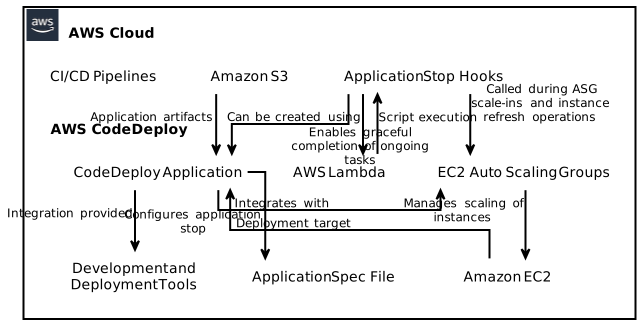
AWS CodeDeploy is a fully managed deployment service that automates the process of deploying applications to Amazon EC2 instances, on-premises instances, or serverless architectures. CodeDeploy simplifies deployments by providing capabilities like rolling updates, blue/green deployments, and integration with various development and deployment tools.
3. Introduction to EC2 Auto Scaling Groups
EC2 Auto Scaling Groups (ASG) is a service that enables automatic scaling of EC2 instances based on predefined conditions, such as CPU utilization, network traffic, or custom metrics. ASGs ensure that the desired number of instances are available to handle the workload and automatically replaces unhealthy instances.
4. Benefits of ASG Scale-Ins
Scale-ins are the process of reducing the capacity of an ASG by terminating EC2 instances. ASG scale-ins are essential for optimizing costs and resource utilization in scenarios of reduced demand or low traffic. Executing scale-ins efficiently allows businesses to dynamically adjust the capacity of their applications based on demand fluctuations.
5. Application Stop Hooks in CodeDeploy
5.1 What are Application Stop Hooks?
Application stop hooks are a feature in AWS CodeDeploy that allow you to define scripts or actions to be executed when an EC2 instance is being stopped or terminated. These hooks enable you to perform actions such as completing ongoing tasks, releasing application resources, or closing outgoing connections before the instance is terminated.
5.2 Use Cases for Application Stop Hooks
- Gracefully terminating connections: Application stop hooks can be used to close open connections, ensuring that no active connections are abruptly terminated.
- Completing ongoing tasks: Hooks enable you to gracefully complete tasks such as finalizing ongoing transactions or persisting critical data.
- Releasing resources: By executing certain actions, like releasing database connections or releasing file locks, application resources can be freed up.
- Custom cleanup actions: Application-specific cleanup activities, like cleaning temporary files or unregistering from external systems, can be performed.
6. Integration of Application Stop Hooks with EC2 Auto Scaling Group Scale-Ins
6.1 Functionality of Application Stop Hooks during Scale-Ins
AWS CodeDeploy now provides the capability to call application stop hooks when an EC2 instance is being stopped during ASG scale-ins. This feature ensures that any necessary cleanup or task completion is performed before the instance is terminated.
6.2 Impact on Ongoing Tasks
During a scale-in event, any ongoing tasks can be gracefully completed using application stop hooks. For example, if your application is processing a batch job, the hook can be utilized to finish processing the current batch before the instance is terminated.
6.3 Releasing Application Resources
Application stop hooks enable the release of application resources. This can include closing database connections, releasing locks, or deleting temporary files. By ensuring proper cleanup, instance terminations can be executed without data corruption or resource leaks.
6.4 Closing Outgoing Connections
Outgoing connections, such as websockets or API connections to external services, can be closed using application stop hooks. This prevents abrupt termination of these connections, ensuring proper handling and avoiding potential data corruption.
7. Application Stop Hooks during ASG Instance Refresh Operations
7.1 Understanding ASG Instance Refresh Operations
ASG instance refresh is a process in which ASG replaces existing instances with the latest launch template or configuration. This operation is useful when patching instances or updating the underlying AMI that the instances are based on.
7.2 Importance of Patching Instances
Regularly patching instances is vital for maintaining security and stability. Application stop hooks can be invoked during instance refresh operations, allowing you to perform patching activities and update instances seamlessly without impacting the availability of your application.
8. Configuring Application Stop Hooks
8.1 Enabling Application Stop Hooks
Application stop hooks are enabled in the CodeDeploy AppSpec file. You need to specify the location of the script or command to be executed.
8.2 Creating Application Stop Hooks
Application stop hooks can be created using scripting languages such as shell scripts, PowerShell, or any programming language supported by AWS Lambda. These scripts should contain the necessary logic to complete tasks, release resources, or close connections gracefully.
8.3 Testing Application Stop Hooks
Testing the behavior of application stop hooks is crucial to ensure their proper execution during scale-ins or instance refresh operations. AWS provides testing tools and integration with the CI/CD pipeline to validate the hooks’ functionality.
9. Best Practices for Using Application Stop Hooks
9.1 Properly Handling Ongoing Tasks
Application stop hooks should be designed to handle ongoing tasks gracefully. Consider implementing logic to ensure that critical processes are gracefully completed before the instance is terminated.
9.2 Managing Application Resources
Managing application resources properly is crucial during scale-ins or instance refresh operations. Ensure that connections, locks, or other resources are released correctly to avoid data corruption or resource leaks.
9.3 Gracefully Closing Outgoing Connections
Outgoing connections should be closed in an orderly manner to avoid any data loss or potential security vulnerabilities. Application stop hooks can be utilized to gracefully handle the closure of these connections.
9.4 Ensuring High Availability of Applications
While executing scale-ins or instance refresh operations, it is essential to maintain high availability of your applications. Properly designed application stop hooks help minimize downtime and ensure a seamless transition.
10. Challenges and Limitations
10.1 Handling Long-Running Tasks
Execution of long-running tasks during scale-ins or instance refresh operations may pose challenges. It is important to consider the time required for your tasks and adjust the timeout settings accordingly.
10.2 Potential Impact on Application Performance
If application stop hooks are not optimized, they may impact the overall performance of your application. Ensure that the hooks execute efficiently to minimize any negative impact on application performance.
11. Monitoring and Troubleshooting Application Stop Hooks
11.1 Monitoring with Amazon CloudWatch
Amazon CloudWatch can be used to monitor the behavior and execution of application stop hooks. By setting up proper monitoring and alarms, you can quickly identify any issues or failures.
11.2 Logging and Debugging
Enabling detailed logging and proper error handling in your application stop hooks can assist in troubleshooting any issues that may arise. Log messages can be sent to Amazon CloudWatch Logs or other logging services for analysis.
12. Conclusion
The integration of application stop hooks with EC2 Auto Scaling Group scale-ins in AWS CodeDeploy brings new possibilities for efficiently managing application resources and tasks during scale-in events. With the ability to gracefully complete ongoing tasks and release resources, applications can be updated or patched seamlessly without impacting availability.
13. References
- AWS CodeDeploy User Guide: https://docs.aws.amazon.com/codedeploy/latest/userguide/welcome.html
- AWS EC2 Auto Scaling User Guide: https://docs.aws.amazon.com/autoscaling/ec2/userguide/what-is-amazon-ec2-auto-scaling.html