
Introduction
In today’s fast-paced world, businesses are constantly looking for ways to optimize their operations and maximize their resources. When it comes to managing large sets of financial data, the kdb database system has emerged as a popular choice for its speed and efficiency. With Amazon FinSpace’s Managed kdb Insights, organizations can now take full advantage of the power of kdb while also leveraging the flexibility and scalability of the cloud.
One common use case for kdb customers is the need to run multiple kdb processes on a single compute host. This allows for efficient resource utilization and improved performance. With the introduction of Scaling Groups in FinSpace Managed kdb Insights on AWS, businesses can now easily run multiple kdb workloads, known as Clusters, on shared compute resources. This guide aims to provide a comprehensive overview of the process, highlighting technical details, relevant considerations, and best practices for optimizing your kdb environment.
Table of Contents
- Understanding Scaling Groups
- Benefits of Running Multiple Kdb Processes on Shared Compute
- Setting Up Scaling Groups in FinSpace Managed kdb Insights
- 3.1. Step 1: Provisioning Compute Resources
- 3.2. Step 2: Configuring Scaling Policies
- 3.3. Step 3: Creating Clusters
- 3.4. Step 4: Monitoring and Managing Clusters
- Considerations for Running Multiple Kdb Processes
- 4.1. Resource Allocation
- 4.2. Data Isolation
- 4.3. Cluster Scheduling
- 4.4. Security and Access Control
- Optimizing Performance of Clusters
- 5.1. Cluster Configuration
- 5.2. Data Partitioning
- 5.3. In-Memory Data Compression
- 5.4. Query Optimization
- 5.5. Monitoring and Fine-tuning
- Conclusion
1. Understanding Scaling Groups
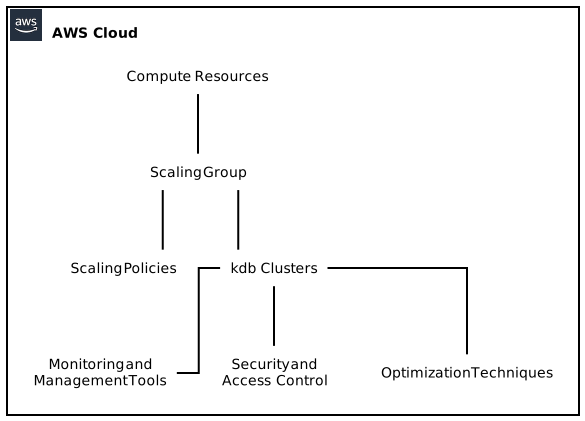
Scaling Groups in FinSpace Managed kdb Insights provide a flexible and scalable approach to running multiple kdb processes on shared compute resources. A Scaling Group is a logical container that allows you to create and manage multiple kdb Clusters, each running on a separate compute instance. By utilizing Scaling Groups, businesses can efficiently allocate compute resources based on the workload demand, allowing for better utilization and cost optimization.
2. Benefits of Running Multiple Kdb Processes on Shared Compute
There are several advantages to running multiple kdb processes on shared compute resources:
2.1. Improved Resource Utilization
By sharing the same compute resources among multiple kdb Clusters, you can maximize the utilization of your infrastructure. This is particularly beneficial when certain Clusters have low resource requirements, allowing them to coexist on the same compute instance as more resource-intensive Clusters.
2.2. Cost Optimization
Running multiple kdb Clusters on shared compute instances can help reduce infrastructure costs. By consolidating your workloads, you avoid the need for dedicated instances for each Cluster, resulting in potential cost savings.
2.3. Enhanced Scalability
Scaling Groups enable seamless scaling of Clusters based on workload demands. As your kdb ecosystem grows, you can easily add or remove compute instances from the Scaling Group, ensuring your infrastructure can handle increasing data volumes and user concurrency.
2.4. Simplified Management
Managing and monitoring multiple kdb processes becomes easier with Scaling Groups. Instead of individually configuring and maintaining each Cluster, you can make changes to the Scaling Group, which automatically applies them across all associated Clusters.
3. Setting Up Scaling Groups in FinSpace Managed kdb Insights
Setting up Scaling Groups for running multiple kdb Clusters on shared compute resources involves several steps. Let’s explore the process in detail:
3.1. Step 1: Provisioning Compute Resources
Before creating Scaling Groups and Clusters, it is necessary to provision the compute resources that will be used. FinSpace Managed kdb Insights offers a range of compute instance types to choose from, each with different specifications and performance characteristics. Careful consideration should be given to selecting the instance type that best suits your workload requirements and budget.
3.2. Step 2: Configuring Scaling Policies
Once you have provisioned the compute resources, the next step is to configure scaling policies. Scaling policies determine how the Scaling Group should react to changes in workload demand. Amazon FinSpace provides several options, such as scaling based on CPU utilization, the number of pending messages, or custom metrics. Depending on your workload patterns, you can define scaling policies to add or remove compute instances based on predefined thresholds.
3.3. Step 3: Creating Clusters
After configuring scaling policies, you can proceed to create individual kdb Clusters within the Scaling Group. Each Cluster represents a separate kdb process running on a compute instance. During the creation process, you can specify the desired instance type, disk storage, and other configuration parameters.
3.4. Step 4: Monitoring and Managing Clusters
Once the Clusters are up and running, it is crucial to continuously monitor and manage their performance. FinSpace provides several built-in monitoring tools and APIs to gain insights into the health and resource utilization of your Clusters. Additionally, you can leverage AWS CloudWatch to set up custom metrics and alarms for proactive monitoring and automated actions.
4. Considerations for Running Multiple Kdb Processes
While running multiple kdb processes on shared compute resources offers numerous benefits, there are some critical considerations to keep in mind:
4.1. Resource Allocation
Efficient resource allocation is key to achieving optimal performance. Carefully analyze the resource requirements of each Cluster and ensure that the compute instances in the Scaling Group are provisioned accordingly. Monitoring resource utilization and periodically adjusting allocation can help avoid bottlenecks and underutilization.
4.2. Data Isolation
It is essential to maintain data isolation between different kdb Clusters running on shared compute instances. Proper data partitioning and access controls should be put in place to prevent data leakage and ensure data integrity.
4.3. Cluster Scheduling
If your workload demands vary throughout the day, scheduling Clusters to run only when needed can lead to further cost optimization. Consider automating the start and stop of Clusters based on predefined schedules or triggers to minimize idle time.
4.4. Security and Access Control
With multiple kdb Clusters running on shared compute resources, security becomes a critical aspect. Implementing robust security measures, including encryption at rest and in transit, access control policies, and regular security audits, is essential to protect sensitive financial data.
5. Optimizing Performance of Clusters
To ensure optimal performance of your kdb Clusters, consider the following factors:
5.1. Cluster Configuration
Properly configuring each Cluster based on its specific workload requirements can significantly impact performance. Tune parameters such as maximum memory, thread count, and disk access settings to achieve the desired balance between speed and resource utilization.
5.2. Data Partitioning
Partitioning your data effectively can improve query performance by reducing the amount of data each Cluster needs to process. Explore partitioning strategies based on factors such as time, symbol, or any other relevant data attribute to achieve optimal data organization.
5.3. In-Memory Data Compression
Leveraging in-memory data compression techniques, such as columnar compression, can significantly reduce memory footprint and improve query execution times. Experiment with different compression algorithms and evaluate their impact on performance.
5.4. Query Optimization
Optimizing your queries is crucial for maximizing the performance of your kdb Clusters. Understand the query patterns and leverage kdb’s powerful indexing capabilities to ensure efficient data retrieval. Regularly analyze query performance and fine-tune as necessary.
5.5. Monitoring and Fine-tuning
Continuously monitoring the performance of your Clusters allows you to identify bottlenecks and areas for improvement. Leverage built-in monitoring tools, log analysis, and performance profiling to gain insights into the behavior of your Clusters. Use this information to fine-tune configurations and optimize overall performance.
6. Conclusion
Running multiple kdb processes on shared compute with Amazon FinSpace’s Managed kdb Insights is a powerful solution for businesses looking to maximize resource utilization, optimize costs, and scale their kdb environments. By leveraging Scaling Groups, organizations can efficiently provision, manage, and monitor multiple kdb Clusters, all while taking advantage of the flexibility and scalability of the cloud.
In this guide, we covered various aspects of setting up and running multiple kdb processes, highlighting important technical considerations and best practices. By following the steps outlined and considering the additional optimization techniques discussed, you can create a robust and performant environment for managing your financial data with kdb and Amazon FinSpace Managed kdb Insights.