

In the era of rapid digital transformation, the security of web applications has never been more critical. With AWS WAF (Web Application Firewall), businesses can enhance their cybersecurity posture. This comprehensive guide will delve into all facets of AWS WAF, establishing it as a vital tool in guarding your online environment.
What is AWS WAF?
AWS WAF is a web application firewall service that helps protect your web applications from common web exploits and bots that can affect availability, compromise security, or consume excessive resources. In essence, AWS WAF enables you to control access to your web applications, mitigate threats, and maintain peak performance.
Table of Contents
- 1. Understanding OWASP Top Ten Threats
- 2. Getting Started with AWS WAF
- 2.1 Setting up AWS WAF
- 2.2 Configuring Rules and Conditions
- 3. Advanced Features of AWS WAF
- 3.1 Bot Control
- 3.2 Rate-Based Rules
- 4. Monitoring and Logging in AWS WAF
- 5. AWS WAF Pricing
- 6. Best Practices in Using AWS WAF
- 7. Integrating AWS WAF with Other AWS Services
- 8. Conclusion
Understanding OWASP Top Ten Threats
The OWASP Top Ten is a fundamental resource that outlines the most critical security risks to web applications. By integrating AWS WAF into your security strategy, you can effectively mitigate many of these risks. Below is a brief overview of the OWASP Top Ten threats that AWS WAF can help defend against:
- Injection Attacks (SQL, NoSQL, OS Command, etc.)
- Broken Authentication
- Sensitive Data Exposure
- XML External Entities (XXE)
- Broken Access Control
- Security Misconfiguration
- Cross-Site Scripting (XSS)
- Insecure Deserialization
- Using Components with Known Vulnerabilities
- Insufficient Logging & Monitoring
Integrating AWS WAF into your security architecture can help diminish vulnerabilities associated with these threats, ensuring a more secure web application deployment.
Getting Started with AWS WAF
Setting up AWS WAF
Getting started with AWS WAF is straightforward. Follow these steps to create and configure your first WAF:
- Sign in to the AWS Management Console.
- Navigate to the AWS WAF & Shield service.
- Choose ‘Create web ACL’:
- Specify the name and description of your ACL.
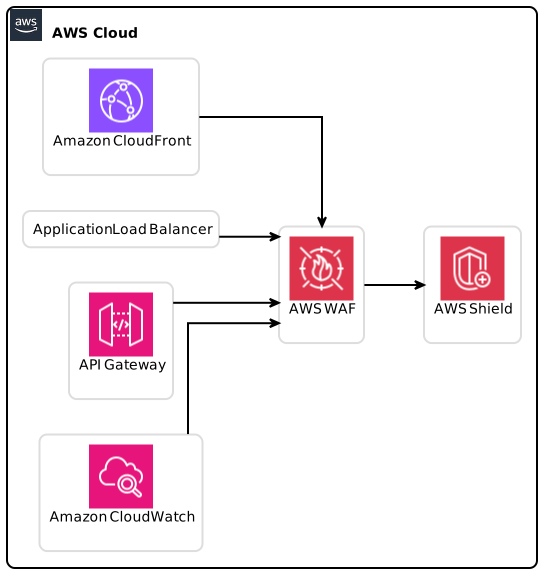
- Choose whether to associate it with an Amazon CloudFront distribution, an Application Load Balancer, or an API Gateway.
- Configure Rules: Select pre-defined rules or create custom rules in accordance with your security policy.
- Set up Default Action: Decide whether to pass or block requests that do not match any rules.
- Review and Create: Once everything is set, review your settings and create your Web ACL.
Configuring Rules and Conditions
Once your Web ACL is established, you can set rules to define what traffic to allow or block.
- Rule Priority: Each rule has a priority rank; AWS WAF evaluates requests based on their priority.
- Conditions: You can set conditions based on IP addresses, HTTP headers, URI strings, query string parameters, and geographical location.
Implementing a well-defined set of rules in AWS WAF will significantly enhance your web applications’ protection levels.
Advanced Features of AWS WAF
Bot Control
One of the most substantial features of AWS WAF is its Bot Control capabilities. This feature identifies and allows you to manage traffic from various bots effectively.
- Managed Rules: AWS offers predefined managed rules that can be used to block known bad bots while allowing good bots (like Google crawler).
- Custom Bot Control: For more granular control, you can create your own custom rules to identify traffic patterns that are indicative of bot behavior.
Rate-Based Rules
Rate-based rules allow you to specify rules that block requests from IP addresses exceeding a predefined threshold.
- Threshold Configuration: Define your threshold (for example, 1000 requests in a 5-minute period).
- Automated Blocking: AWS WAF automatically blocks IPs that exceed this threshold, protecting your applications from potential Denial of Service (DoS) attacks.
Monitoring and Logging in AWS WAF
Effective monitoring and logging are critical components of web application security. AWS WAF provides tools to monitor your application traffic and maintain logs of all requests.
- CloudWatch Integration: You can gain insights into Web ACL performance through Amazon CloudWatch metrics and logs.
- Logging Requests: Configure logging for all requests processed by AWS WAF, enabling forensic analysis in the event of an attack.
- Compliance and Audit: Maintain comprehensive logs to aid in compliance with IT regulations and for effective audits.
AWS WAF Pricing
Understanding AWS WAF pricing is vital for budgeting and maximizing your investment. Pricing is based on several factors:
- Web ACLs: You are charged for each Web ACL you create.
- Rule Charges: There are costs associated with every rule you add to the Web ACL.
- Requests: You’ll be billed per million web requests processed through AWS WAF.
For a full breakdown of pricing, visit the AWS WAF Pricing page.
Best Practices in Using AWS WAF
Implementing AWS WAF effectively requires adherence to several best practices:
- Regular Rule Review: Periodically assess your set of rules and remove any that are no longer necessary.
- Combine AWS WAF with Other Tools: Use AWS Shield for DDoS protection along with AWS WAF for a multi-layered security approach.
- Test Configurations: Regularly test the effectiveness of your rules through simulated attacks.
- Keep Up-to-Date: Stay updated with AWS announcements and updates regarding new features and enhancements.
For additional best practices, you can refer to the AWS Security Resource Center.
Integrating AWS WAF with Other AWS Services
AWS WAF’s capabilities expand significantly when integrated with other AWS services:
- Amazon CloudFront: Place AWS WAF in front of CloudFront to benefit from geographical distribution.
- Applications Load Balancer: AWS WAF works seamlessly with Elastic Load Balancing, providing layer 7 protections.
- API Gateway: Secure your APIs effectively through AWS WAF, analyzing traffic patterns on your API layers.
Why Integrate?
Integrating AWS WAF enhances overall security postures by utilizing multiple defenses and centralized management capabilities. It ensures that all service layers in your architecture adhere to the best security practices collectively.
Conclusion
In summary, implementing AWS WAF is instrumental for organizations looking to secure their web applications against evolving threats. By understanding its features—from basic setup to fine-tuning advanced rules—users can play an active role in bolstering their application’s defenses. Regular monitoring, combined with AWS’s advanced features such as Bot Control and Rate-Based Rules, positions AWS WAF as a robust solution in a multi-layered security architecture.
For further development, businesses should continuously educate their team on the latest security trends, AWS features, and updates to optimize their AWS WAF implementations.
Key Takeaways
- AWS WAF is vital in securing web applications.
- Understanding OWASP Top Ten vulnerabilities can guide the deployment of effective rules.
- Regular monitoring and tuning of AWS WAF configurations are essential to maintain robust security.
As web security threats continue to evolve, the importance of using AWS WAF will only grow. Ensure you’re utilizing this exceptional service to protect your online resources effectively.
For a deeper understanding and to implement strategies that secure your web application resources, explore comprehensive features and pricing on the official AWS WAF page.
Focus Keyphrase: AWS WAF