

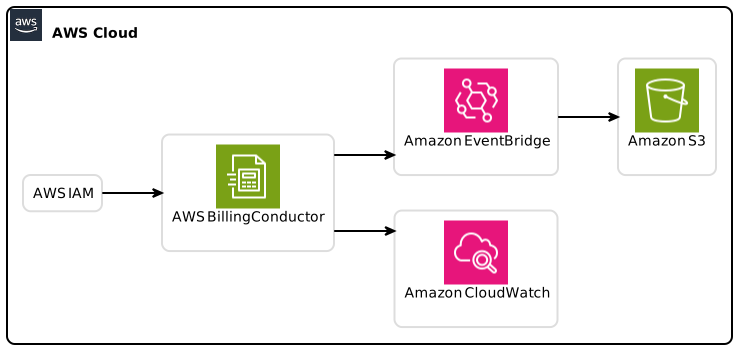
Introduction
In the world of cloud services, managing expenses is crucial for both businesses and individual developers. AWS Invoice Summary API has recently been made generally available, transforming the way you can handle AWS invoice details. With the ability to programmatically retrieve invoice summaries, users can streamline the way they manage their finances, reducing manual work and potential errors. This guide aims to educate you on how to effectively utilize the AWS Invoice Summary API, providing actionable insights, technical details, and best practices to enhance your experience.
What is the AWS Invoice Summary API?
The AWS Invoice Summary API enables you to fetch invoice summary data for your AWS accounts programmatically. It allows you to retrieve multiple invoice summary details with a single API call using parameters like AWS Account ID, AWS Invoice ID, billing period, or a specified date range.
Key Features:
- Retrieve invoice summaries for different accounts at once.
- Input parameters such as invoice ID and date ranges for targeted queries.
- Access essential data elements including the invoice amount, purchase order numbers, and other metadata.
Why Use the AWS Invoice Summary API?
Utilizing the AWS Invoice Summary API can greatly enhance your ability to manage AWS invoices. Here are some reasons to incorporate this API into your systems:
- Efficiency: Automate invoice retrieval to save time and reduce errors associated with manual entry.
- Integration Capabilities: Easily integrate with existing accounts payable systems to smooth out workflows.
- Centralized Data Access: Gather invoice information from multiple accounts in one fell swoop, ensuring that no detail is overlooked.
Getting Started with the AWS Invoice Summary API
Before diving into the technical details, it’s essential to understand how to get started with the AWS Invoice Summary API. In this section, we cover prerequisites, configuration settings, and fundamental concepts.
Prerequisites
AWS Account: You’ll need an active AWS account to start using the API.
AWS SDK: Familiarity with the AWS SDK is crucial. Ensure you have it installed for the respective programming language (Node.js, Python, Java, etc.).
IAM Permissions: Ensure your IAM roles have the necessary permissions to access the Invoice Summary API.
Postman or Similar Tool: For testing API requests and responses, tools like Postman are invaluable.
Setting Up Your Environment
Install the SDK: Use npm for Node.js, pip for Python, or the appropriate method for your chosen SDK.
bash
pip install boto3 # Example for PythonConfigure Your Credentials: Make sure your AWS credentials are in place, which typically reside in
~/.aws/credentials.
ini
[default]
aws_access_key_id = YOUR_ACCESS_KEY
aws_secret_access_key = YOUR_SECRET_KEY
First API Call
Start by making your first request to the AWS Invoice Summary API. Make sure you replace placeholder values with actual account parameters.
python
import boto3
Initialize a session using your credentials
session = boto3.Session()
client = session.client(‘billingconductor’, region_name=’us-east-1′)
Making a request to retrieve an invoice summary
response = client.get_invoice_summary(
AccountId=’123456789012′,
InvoiceId=’INV-12345678′,
)
print(response)
The code above represents a straightforward method to interact with the API. Be sure to consult the official AWS documentation for advanced configuration and options.
Understanding the Output
When you retrieve data from the AWS Invoice Summary API, you will be presented with several pieces of information, including:
- Invoice Amount: The total cost in your base currency.
- Tax Currency Amount: The amount that accounts for taxes.
- Purchase Order Number: An optional field that may assist in invoice reconciliation.
- Metadata: Additional contextual information about the invoice.
Key Data Elements Explained
- Invoice Amount: Detailed calculations that could impact your budgeting.
- Purchase Order Number: Crucial for procurement teams tracking expenses against budgets.
Best Practices for Using AWS Invoice Summary API
Incorporating best practices is critical for the effective use of the AWS Invoice Summary API. Here are some guidelines:
1. Enable Efficient Error Handling
In a production environment, it’s essential to have robust error handling in place. Ensure that your API calls have try-catch blocks and handle errors gracefully:
python
try:
response = client.get_invoice_summary(…)
except client.exceptions.InvalidParameterException as e:
print(f”Invalid parameter: {e}”)
Handle other specific exceptions as needed
2. Optimize API Calls
Too many API requests can lead to throttling. Optimize your workflow by batching requests and caching responses when appropriate.
3. Monitor Usage
Keep tabs on how often you’re querying the API. Implement logging to understand usage patterns and adjust your calls accordingly.
4. Secure Your API Keys
Follow AWS best practices by safeguarding your API keys and utilizing IAM roles. Apply the principle of least privilege by only granting necessary permissions.
Advanced Integration Use Cases
The AWS Invoice Summary API can integrate seamlessly with various applications and workflows. Here are a few sophisticated use cases:
Automated Billing in Financial Software
Integrating the Invoice Summary API with financial applications can eliminate manual data entry and reconcile invoices automatically, reducing operational overhead.
Cost Allocation Within Multitenant Environments
For businesses with multiple teams or projects, leveraging the API can facilitate accurate cost allocation for budgeting, helping teams manage their cloud spending effectively.
Dashboards for Financial Reporting
Building analytics dashboards with live data feeds from the AWS Invoice Summary API allows decision-makers to visualize cloud expenditure and trends in real-time.
Summary of Key Takeaways
The AWS Invoice Summary API enables efficient programmatic access to AWS invoice data, streamlining workflows and enhancing financial management.
Key prerequisites include configuring your AWS environment and ensuring you have the right permissions.
Best practices like effective error handling, API call optimization, and API key security are crucial for a seamless experience.
Next Steps
As you’ve learned in this guide:
- Explore the AWS documentation for additional parameters and complex integration scenarios.
- Experiment with the API in a sandbox environment and gradually scale to production use.
- Stay informed about new features and enhancements that AWS continually introduces.
With the AWS Invoice Summary API at your disposal, managing your AWS invoices has never been easier. Embrace this tool to improve your financial operations today.
In conclusion, mastering the AWS Invoice Summary API not only offers operational efficiency but also empowers you to make data-driven financial decisions.
Happy Coding!
This article focuses on the AWS Invoice Summary API, delivering technical insights and practical steps for effective integration.