

Introduction
Amazon Web Services (AWS) offers an incredible range of cloud computing services and features. One of the most popular offerings is the AWS Free Tier, which allows users to explore various AWS services free of charge, within certain usage limits. In a recent update, AWS has added 750 hours of free Public IPv4 addresses to the Free Tier. This guide will provide you with a comprehensive understanding of AWS Free Tier and how to make the best use of this new addition.
Table of Contents
- What is AWS Free Tier?
- Understanding Public IPv4 Addresses
- AWS Free Tier and Public IPv4 Addresses
- Charges for Public IPv4 Addresses
- How to Track Public IPv4 Address Usage
- Monitoring and Auditing Public IPv4 Address Usage
- Optimizing Public IPv4 Address Usage
- Additional Technical Points to Consider
- Conclusion
1. What is AWS Free Tier?
AWS Free Tier is a program offered by Amazon Web Services that provides free access to a wide range of AWS services. It allows users, particularly those new to AWS, to explore and experiment with these services without incurring any costs. The Free Tier makes it easier for developers, businesses, and individuals to get started with AWS and understand its potential.
2. Understanding Public IPv4 Addresses
Public IPv4 addresses are unique numerical identifiers that are assigned to devices connected to the internet. These addresses allow devices to communicate with each other over the internet. In AWS, Public IPv4 addresses are used to enable inbound and outbound communication for EC2 instances.
3. AWS Free Tier and Public IPv4 Addresses
With the recent update, AWS Free Tier now includes 750 hours of free Public IPv4 addresses. This means that you can use a Public IPv4 address for up to 750 hours per month without any additional charges. However, it’s important to note that this free usage applies only to in-use public IPv4 addresses.
4. Charges for Public IPv4 Addresses
If you exceed the 750 hours per month of in-use public IPv4 address usage, you will be charged at a rate of $0.005 per IP per hour. This is a reasonable and affordable cost considering the benefits and accessibility of AWS services. It’s worth noting that this pricing change does not affect idle public IPv4 addresses that are allocated in your account but not attached to an EC2 instance.
5. How to Track Public IPv4 Address Usage
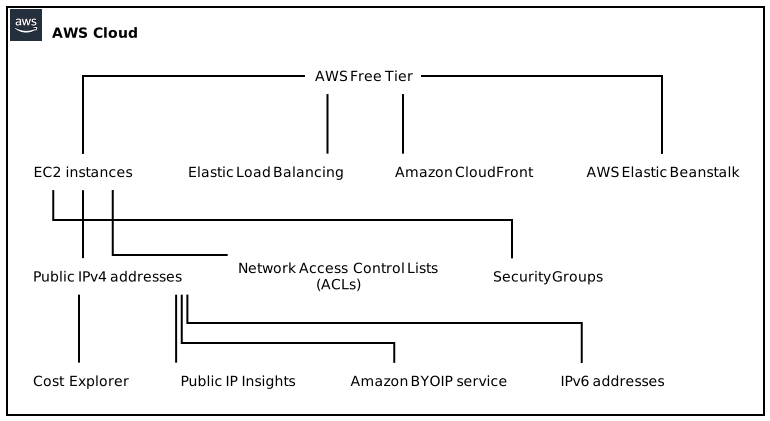
To keep track of your public IPv4 address usage, AWS provides the Cost Explorer tool. This powerful tool allows you to monitor resource usage and costs associated with your AWS account. By using Cost Explorer, you can easily identify how many hours of in-use public IPv4 addresses you have consumed in a given month.
6. Monitoring and Auditing Public IPv4 Address Usage
In addition to the Cost Explorer, AWS offers an insightful feature called Public IP Insights. With Public IP Insights, you can monitor and audit your use of public IPv4 addresses. This tool provides valuable visibility into the usage patterns of your public IPv4 addresses, allowing you to identify any inefficiencies and optimize your usage.
7. Optimizing Public IPv4 Address Usage
To optimize your public IPv4 address usage, consider the following best practices:
- Release Unused Addresses: Regularly review your EC2 instances and release any unused public IPv4 addresses. This helps reduce costs and ensures efficient resource allocation.
- Leverage Elastic IP Addresses: Elastic IP addresses are public IPv4 addresses that you can allocate to your AWS account and attach to your instances as needed. By using Elastic IP addresses, you can easily associate and disassociate public IPv4 addresses to your instances, providing greater flexibility.
8. Additional Technical Points to Consider
When working with AWS Free Tier and Public IPv4 addresses, there are a few additional technical points to keep in mind:
Amazon BYOIP: If you own IPv4 addresses that you bring to AWS using Amazon BYOIP (Bring Your Own IP) service, these addresses will continue to be free. BYOIP allows you to seamlessly migrate your existing IP address space to AWS, eliminating the need to reconfigure your applications.
IPv6 Support: While this guide focuses on the use of Public IPv4 addresses, it’s important to note that AWS also provides support for IPv6. IPv6 addresses offer a larger address space compared to IPv4 and are gradually becoming the standard for internet communication.
Integration with Other AWS Services: Public IPv4 addresses can be integrated with several other AWS services, such as Elastic Load Balancing, Amazon CloudFront, and AWS Elastic Beanstalk. This integration allows you to build scalable, highly available, and secure applications in the AWS environment.
Security Considerations: When using public IPv4 addresses, it’s important to implement proper security measures. AWS provides a range of security features, such as Network Access Control Lists (ACLs) and Security Groups, to ensure that your resources are protected against unauthorized access.
9. Conclusion
AWS Free Tier provides an excellent opportunity to explore and experiment with various AWS services free of charge. The recent addition of 750 hours of free Public IPv4 addresses further enhances the capabilities of the Free Tier. By understanding how Public IPv4 addresses work, monitoring your usage, and optimizing your resource allocation, you can make the most out of AWS Free Tier and leverage AWS services effectively. Remember to keep an eye on any additional updates and exciting changes that AWS may introduce to your advantage.