
Introduction
In today’s digital era, live streaming has become a powerful tool for businesses, content creators, and individuals to engage with their audience in real-time. Amazon Interactive Video Service (IVS) provides an advanced and scalable live streaming solution to deliver low-latency streaming videos. With the introduction of playback restriction policies, Amazon IVS now offers enhanced security measures and targeted viewership control to protect your valuable live streams. In this comprehensive guide, we will explore and explain how you can utilize playback restriction policies in Amazon IVS to restrict access to your low-latency streaming videos effectively. We will also dive into additional technical and relevant points, focusing on SEO strategies to optimize your live streaming content.
Table of Contents
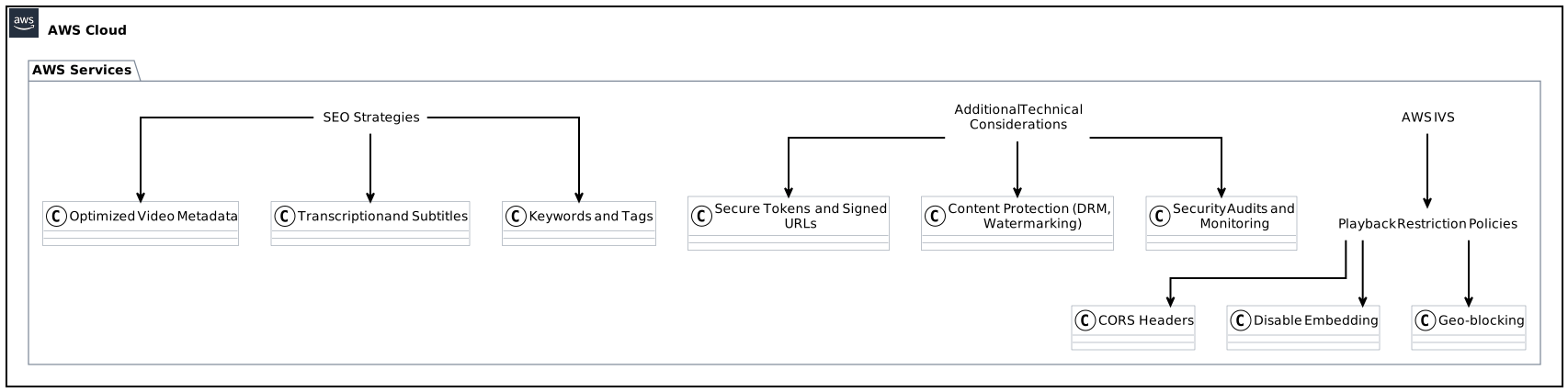
- Understanding Playback Restriction Policies in Amazon IVS
- Defining CORS headers for controlled access to live streams
- Preventing unauthorized embedding on third-party websites
Implementing geo-blocking for targeted viewership
Configuring Playback Restriction Policies in Amazon IVS
- Establishing CORS headers for selective origins
- Restricting embedding on third-party websites
Geographically limiting viewership for intended audiences
Additional Technical Considerations for Enhanced Security
- Secure tokens and signed URLs: Strengthening access control
- Content protection: Combating piracy and unauthorized distribution
Regular security audits and monitoring: Ensuring continuous protection
Leveraging SEO Strategies for Optimal Visibility
- Optimizing video metadata for search engine indexing
- Integrating transcription and subtitles for improved accessibility and SEO
Utilizing relevant keywords and tags to drive organic traffic
Conclusion
1. Understanding Playback Restriction Policies in Amazon IVS
1.1 Defining CORS headers for controlled access to live streams
Cross-Origin Resource Sharing (CORS) headers play a critical role in allowing or denying access to resources on a web page from different origins. By configuring CORS headers in Amazon IVS, you gain granular control over which origins can access your low-latency streaming videos. Restricting access to only trusted origins enhances the security of your live streams, preventing unauthorized parties from viewing or embedding them.
1.2 Preventing unauthorized embedding on third-party websites
One common concern for content creators and businesses is the unauthorized embedding of their live streams on third-party websites. Playback restriction policies in Amazon IVS empower you to prevent this unethical practice by selectively disabling embedding capabilities. By disabling embedding, you ensure that your live streams are only accessible on authorized platforms, preserving the integrity of your content and preventing unauthorized distribution and monetization.
1.3 Implementing geo-blocking for targeted viewership
To ensure that your live streams are viewed only by the intended audience, geo-blocking in Amazon IVS offers a powerful solution. With geo-blocking, you can restrict viewership based on specific countries or regions, effectively targeting your content to audiences in designated areas. This feature is particularly useful for businesses and organizations that want to comply with regional broadcasting regulations, protect licensing agreements, or deliver region-specific content.
2. Configuring Playback Restriction Policies in Amazon IVS
2.1 Establishing CORS headers for selective origins
To configure CORS headers in Amazon IVS, follow these steps:
- Access the Amazon IVS console and navigate to the “Channels” section.
- Select the specific channel for which you want to configure playback restrictions.
- Under the channel settings, locate the “Playback Restriction Policies” option.
- Add the desired origins to the CORS headers section, specifying the URLs or domains that are authorized to access your live streams.
- Save the changes and ensure that the updated CORS headers are being applied correctly.
2.2 Restricting embedding on third-party websites
Enabling the restriction of embedding on third-party websites involves the following steps:
- Access the Amazon IVS console and go to the “Channels” section.
- Choose the desired channel where you wish to disable embedding.
- Locate the “Playback Restriction Policies” option under the channel settings.
- Toggle the “Enable” button for the “Disable embedding” feature.
- Save the changes and validate that embedding is effectively disabled on unauthorized platforms.
2.3 Geographically limiting viewership for intended audiences
Geographic viewership restriction can be enabled using the following procedure:
- Visit the Amazon IVS console and navigate to the “Channels” section.
- Select the channel you want to apply the geographic restriction to.
- Locate the “Playback Restriction Policies” option in the channel settings.
- Enable the “Enable geographic restriction” feature.
- Specify the countries or regions that are allowed or denied access to your live streams.
- Save the changes and verify that the geographic restriction is functioning correctly.
3. Additional Technical Considerations for Enhanced Security
3.1 Secure tokens and signed URLs: Strengthening access control
To further enhance security and prevent unauthorized access to your low-latency streaming videos, consider implementing secure tokens or signed URLs:
- Secure tokens: Generate and validate time-limited tokens that grant temporary access to your live streams. These tokens expire after a pre-defined duration, ensuring that only authenticated users can view your content.
- Signed URLs: Create URL signatures that include authentication information, such as expiration times and access permissions. Signed URLs provide secure, tamper-proof links, protecting your live streams from unauthorized distribution.
3.2 Content protection: Combating piracy and unauthorized distribution
The protection of your live streaming content from piracy and unauthorized distribution requires implementing robust content protection measures:
- Digital Rights Management (DRM): Employ DRM technologies to encrypt and decrypt your live streams, ensuring that only authorized recipients can decode and view the content.
- Watermarking: Embed visible or invisible watermarks in your live streams to deter unauthorized sharing. Watermarks can contain copyright information or unique identifiers, assisting in identifying and tracking unauthorized copies.
3.3 Regular security audits and monitoring: Ensuring continuous protection
To maintain a secure live streaming environment, conduct regular security audits and implement proactive monitoring mechanisms:
- Penetration testing: Regularly assess your live streaming infrastructure for potential vulnerabilities and weak points. Penetration testing helps identify and address security flaws before they can be exploited.
- Real-time monitoring: Utilize monitoring tools to track and analyze access patterns, suspicious activities, and potential security breaches. Real-time monitoring enables immediate response to any security incidents, mitigating potential risks effectively.
4. Leveraging SEO Strategies for Optimal Visibility
4.1 Optimizing video metadata for search engine indexing
To maximize the discoverability of your live streams, ensure optimal indexing by search engines:
- Title and description: Craft descriptive and engaging titles and descriptions for your live stream videos. Include relevant keywords and phrases to improve search engine visibility.
- Tags and categories: Use appropriate tags and categorization to help search engines understand the context and topic of your live streams. Select tags that align with your content and audience interests.
4.2 Integrating transcription and subtitles for improved accessibility and SEO
To enhance accessibility and support SEO efforts, consider integrating transcriptions and subtitles into your live streams:
- Automatic speech recognition (ASR): Utilize ASR technology to transcribe the audio content of your live streams. Transcriptions provide accessibility to hearing-impaired viewers and also make your content searchable by search engines.
- Multilingual subtitles: Offer subtitles in multiple languages to cater to a broader audience base. Multilingual subtitles not only improve accessibility but also contribute to better search engine indexing by adding additional metadata.
4.3 Utilizing relevant keywords and tags to drive organic traffic
Optimize the findability and organic traffic generation of your live streams by utilizing targeted keywords and tags:
- Keyword research: Conduct comprehensive keyword research to identify trending terms, phrases, and audience interests related to your live stream content. Incorporate these targeted keywords naturally throughout your video metadata.
- Social media promotion: Leverage popular social media platforms to engage with your audience and increase the visibility of your live streams. Utilize relevant hashtags and tags while promoting your content to drive organic traffic.
5. Conclusion
Playback restriction policies in Amazon IVS offer powerful tools to enhance the security of your low-latency streaming videos, ensuring they are accessed only by authorized users and viewed by your intended audience. By configuring CORS headers, disabling unauthorized embedding, and implementing geo-blocking, you can effectively control access and protect your valuable live streams. Additionally, consider implementing secure tokens, signed URLs, content protection measures, and regular security audits to further fortify the security of your live streaming infrastructure. By leveraging SEO strategies such as optimizing video metadata, integrating transcription and subtitles, and utilizing relevant keywords and tags, you can drive organic traffic and maximize the visibility of your live streams in search engine results. Embrace the power of playback restriction policies and SEO optimization to unlock the full potential of Amazon IVS for your live streaming endeavors.