
Introduction
In today’s globally distributed application landscape, ensuring high availability and disaster recovery is paramount. With the Amazon Aurora Global Database for PostgreSQL, you can achieve these goals by spanning a single Aurora database across multiple AWS Regions. This guide will walk you through the various aspects of using the Global Database feature, with a specific focus on SEO.
Table of Contents
- What is Amazon Aurora Global Database for PostgreSQL?
- Benefits of Global Database for PostgreSQL
- Enabling Write Forwarding with Global Database
- Compatibility Requirements
- Configuring Global Write Forwarding
- Understanding Consistency Levels
- Managing Global Database using AWS Management Console
- Leveraging Global Database with the Command Line Interface (CLI)
- Programmatically Controlling Global Database using RDS API
- Availability of Global Database for PostgreSQL
- Conclusion
1. What is Amazon Aurora Global Database for PostgreSQL?
Amazon Aurora Global Database for PostgreSQL is a feature that enables you to create a distributed, highly available database solution. It allows a single Aurora database to span multiple AWS Regions, providing disaster recovery options and ensuring low-latency local reads for globally distributed applications.
2. Benefits of Global Database for PostgreSQL
By using the Aurora Global Database feature, you can reap several benefits for your PostgreSQL database:
- Disaster Recovery: In the event of a Region-wide outage, Global Database ensures your applications remain available by redirecting requests to a secondary Region.
- Low-Latency Read Access: With replicas located closer to your users, read requests are served with low latency, improving the overall user experience.
- Improved SEO: Global Database enables you to have data centers in multiple geographical locations, which can positively impact your website’s SEO rankings by reducing latency for users in different regions.
- Simplified Architecture: Instead of managing multiple databases in different Regions, Global Database allows you to maintain a single, globally distributed database.
- Cost Savings: With Global Database, you can optimize costs by using read replicas in secondary Regions, reducing the need for expensive cross-region data transfers.
3. Enabling Write Forwarding with Global Database
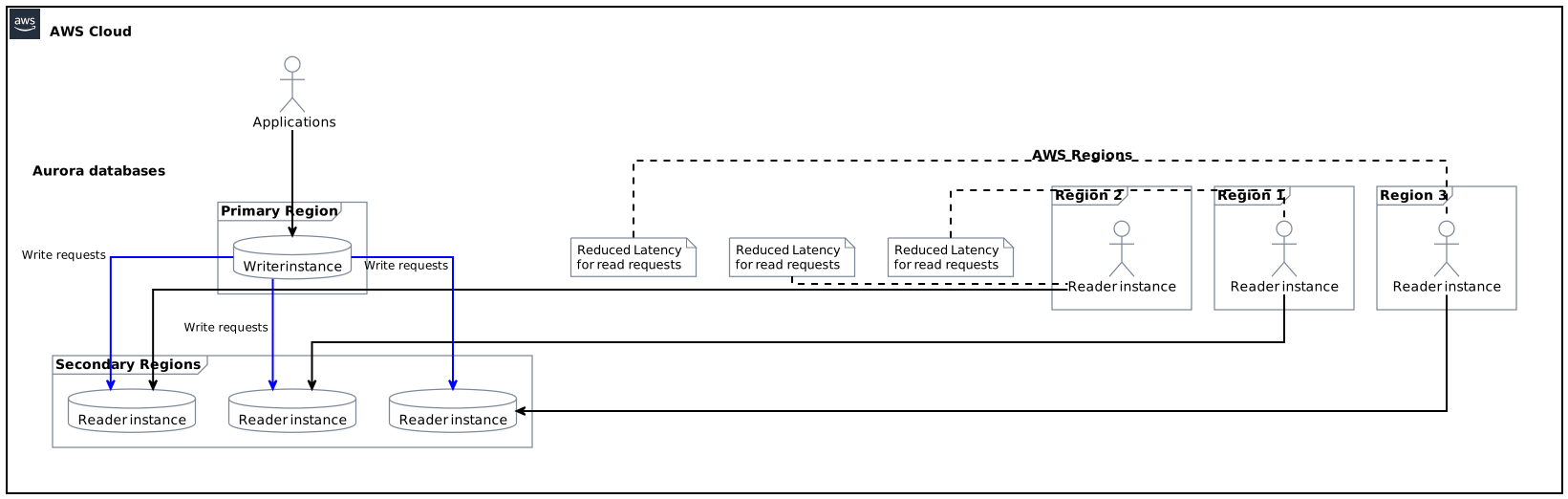
One of the key features of Amazon Aurora Global Database is write forwarding. This feature allows your applications to send both read and write requests to a reader in a secondary Region, while the Global Database handles forwarding the write requests to the writer in the primary Region.
Write forwarding provides the following advantages:
- Low-Latency Writes: By writing to a local reader, your applications experience reduced latency for write requests, improving overall performance.
- Simplified Application Code: With write forwarding, your application code doesn’t need to handle the logic of routing writes to the primary Region, as Global Database takes care of this automatically.
- Seamless Failover: In the event of a primary Region failure, Global Database automatically promotes a reader to the writer, ensuring that your applications can continue writing without interruption.
4. Compatibility Requirements
To use write forwarding with Global Database for PostgreSQL, your database must meet the following compatibility requirements:
- Aurora MySQL versions 2.08.1 or higher
- Aurora PostgreSQL versions 14.9, 15.4, or higher
Ensure that your database meets the version requirements before enabling the write forwarding feature.
5. Configuring Global Write Forwarding
To enable write forwarding with Global Database for PostgreSQL, you can use one of the following methods:
- AWS Management Console: Log in to the AWS Management Console, navigate to the Aurora Global Database for PostgreSQL service, and turn on the “enable global write forwarding” option.
- Command Line Interface (CLI): Use the AWS CLI to enable write forwarding by running the appropriate command, specifying the target Aurora Global Database.
- RDS API: Programmatically enable write forwarding by making the necessary API calls to the RDS service, passing the required parameters.
Choose a method that aligns with your workflow and preferences to enable the write forwarding feature.
6. Understanding Consistency Levels
Global Database for PostgreSQL allows you to specify different consistency levels according to your application requirements. Consistency levels dictate how up-to-date the data is on the reader instances compared to the writer instance. There are three levels of consistency available:
- Eventual Consistency: This level provides the lowest latency for read requests as the data may not be immediately up-to-date. Use this level when low-latency read access is more critical than having the latest data.
- Session Consistency: With session consistency, the reader instances are updated with the latest data when the session starts. During the session, the data remains consistent, but subsequent sessions may not have the latest data.
- Global Consistency: This level ensures strong consistency across all reader instances, guaranteeing that the data is up-to-date. However, global consistency comes with additional latency due to the synchronization process.
Choose the consistency level that balances both performance and data freshness for your application.
7. Managing Global Database using AWS Management Console
The AWS Management Console provides a user-friendly interface to manage your Amazon Aurora Global Database for PostgreSQL. Key management tasks you can perform with the console include:
- Creating a Global Database: Use the console to create a new Global Database by selecting the necessary configuration options and specifying the primary and secondary Regions.
- Enabling Write Forwarding: Once the Global Database is created, navigate to the console to enable the write forwarding feature. Toggle the “enable global write forwarding” option to activate the feature.
- Monitoring and Troubleshooting: The console provides various monitoring and troubleshooting tools to help you track the performance and health of your Global Database, such as the ability to view replication lag and read/write latency.
Leverage the console’s intuitive interface to efficiently manage your Global Database instances.
8. Leveraging Global Database with the Command Line Interface (CLI)
For those who prefer command-line interactions, the AWS Command Line Interface (CLI) offers a robust set of commands to manage your Global Database instances. Some of the key CLI commands include:
- Creating a Global Database: Use the
aws rds create-global-databasecommand to create a new Global Database, providing the necessary parameters such as the source DB instance and secondary Regions. - Enabling Write Forwarding: Activate write forwarding using the
aws rds modify-global-clustercommand, specifying the target Global Database and enabling the write forwarding option. - Listing Global Databases: Retrieve a list of all Global Databases associated with your AWS account using the
aws rds describe-global-db-clusterscommand.
Streamline your Global Database management workflow by utilizing the power of the AWS CLI.
9. Programmatically Controlling Global Database using RDS API
If you prefer to programmatically control your Global Database instances, the Amazon RDS API provides a comprehensive set of APIs to interact with the service. You can perform various operations such as:
- Creating a Global Database: Programmatically create a Global Database by calling the
CreateGlobalClusterAPI endpoint, specifying the necessary parameters. - Enabling Write Forwarding: Enable write forwarding by making a
ModifyDbClusterAPI call, passing the appropriate parameters to enable write forwarding. - Monitoring Global Database: Fetch metrics and monitoring data using the
DescribeGlobalClustersAPI endpoint, allowing you to programmatically track the health and performance of your Global Database.
Automate and integrate your Global Database management tasks into your existing workflows using the RDS API.
10. Availability of Global Database for PostgreSQL
Global Database for PostgreSQL is available in all AWS regions where Aurora Global Database for PostgreSQL is available. Ensure that your desired region supports the Global Database feature before planning your deployments.
For an up-to-date list of AWS regions where Global Database for PostgreSQL is available, refer to the official AWS documentation.
11. Conclusion
Amazon Aurora Global Database for PostgreSQL provides a powerful solution for globally distributed applications, offering disaster recovery capabilities, low-latency reads, and improved SEO rankings. This guide has covered the various aspects of using Global Database with a specific focus on SEO optimizations. Whether you prefer using the AWS Management Console, CLI, or RDS API, you have the flexibility to manage and configure your Global Database instances to meet your specific application needs.
Ensure that you thoroughly understand the compatibility requirements, configure write forwarding, and choose the appropriate consistency level to maximize the benefits of Amazon Aurora Global Database for PostgreSQL.
For more in-depth information, refer to the official AWS documentation on Amazon Aurora Global Database for PostgreSQL. Happy Global Database deployment!