

The AWS Data Transfer Terminal represents a revolutionary advancement in data migration and management. With its recent announcement of a new Data Transfer Terminal location in Munich, AWS is paving the way for businesses in Europe to effortlessly move substantial data to the cloud. In this comprehensive guide, we’ll explore everything you need to know about AWS Data Transfer Terminals, including their benefits, use cases, and actionable steps to optimize your data transfer process.
Table of Contents
- What Are AWS Data Transfer Terminals?
- Key Benefits of Using AWS Data Transfer Terminals
- Use Cases Across Various Industries
- How to Get Started with AWS Data Transfer Terminal
- Step-by-Step Guide to Data Transfer
- Best Practices for Data Migration
- Security Considerations for Data Transfers
- Integrating AWS Services Post-Transfer
- Future Predictions for Data Migration Technologies
- Conclusion: Key Takeaways and Next Steps
What Are AWS Data Transfer Terminals?
AWS Data Transfer Terminals are secure, physical locations designed specifically for the high-speed transfer of data to AWS services such as Amazon S3 and Amazon EFS. With the recent opening of the Equinix MU1 location in Munich, customers can now have a more accessible option for uploading massive amounts of data securely.
Key Features
- High Throughput Network Connection: Facilitates rapid data uploads, enabling organizations to streamline their data management processes.
- Secure Environment: The terminals are provided in a secure infrastructure, ensuring the safety of sensitive data during the transfer process.
- Support for Various Storage Devices: Businesses can use various supported storage devices to transfer their data to AWS.
Key Benefits of Using AWS Data Transfer Terminals
1. Speed and Efficiency
The ability to transfer large datasets quickly is critical for many businesses. The Data Transfer Terminal optimizes this process, drastically reducing the time needed for data uploads, from weeks to mere minutes.
2. Cost-Effectiveness
Transferring data via traditional means can be costly in terms of time and resources. AWS Data Transfer Terminals eliminate many of those overheads by providing an efficient and optimized route for data movement.
3. Reduced Risk of Data Loss
Using AWS Data Transfer Terminals enhances the reliability of data migrations, minimizing the potential for data loss or corruption during the transfer process.
4. Seamless Integration with AWS Ecosystem
Once the data is uploaded to AWS, businesses can immediately tap into the vast array of AWS services for analysis, application development, and more.
Use Cases Across Various Industries
AWS Data Transfer Terminals cater to a variety of industries, providing solutions tailored to specific data needs.
1. Automotive: Advanced Driver Assistance Systems (ADAS)
Automotive manufacturers require vast amounts of training data to improve ADAS capabilities. The Data Transfer Terminal allows for rapid and secure data uploads, facilitating faster development cycles.
2. Media and Entertainment: Video Production
In the media sector, video production data must often be processed quickly and efficiently. The Data Transfer Terminal allows production companies to upload their raw footage in a secure and fast manner.
3. Financial Services: Migrating Legacy Data
Financial institutions often face challenges related to migrating legacy data systems to more modern architectures. The Data Transfer Terminal offers an efficient mechanism for accomplishing this task with security measures in place.
4. Agriculture and Industry: Sensor Data Uploads
Agricultural and industrial sectors can benefit greatly from the ability to quickly upload sensor data to the cloud. This data can then be analyzed for improvements in machinery and crop yield.
How to Get Started with AWS Data Transfer Terminal
Getting started with AWS Data Transfer Terminal is a straightforward process. Here’s a quick outline:
- Reservation: Make a reservation at your nearest Data Transfer Terminal through the AWS Console.
- Prepare Data: Gather and prepare your data for transfer. Ensure that your storage devices are compatible with AWS requirements.
- Visit the Terminal: Bring your storage devices to the selected Data Transfer Terminal.
- Upload Data: Follow the procedures at the terminal for uploading your data.
Refer to the official AWS Data Transfer Terminal documentation for specific guidance on this process.
Step-by-Step Guide to Data Transfer
This section walks you through the detailed steps of transferring data using AWS Data Transfer Terminals.
Step 1: Prepare Your Data
- Identify Data: Determine what data you need to transfer.
- Select Storage Devices: Choose the appropriate storage devices that will be used to carry the data. Common devices include hard drives, SSDs, and NAS systems.
Step 2: Make a Reservation
- AWS Console Log-in: Sign in to your AWS account and navigate to the Data Transfer Terminal section.
- Select Location: Choose your nearest terminal. The new Munich location enhances accessibility in Europe.
- Confirm Reservation: Review and confirm your reservation. Make sure to note the terminal hours of operation.
Step 3: Transfer Data
- Packaging Devices: Ensure that your storage devices are securely packaged to prevent physical damage.
- Arrival at Terminal: Upon arrival, check in with staff for guidance on the uploading process.
- Data Upload: Follow the on-site guidance to upload your data. Ensure that you monitor the process for any issues.
Step 4: Post-Transfer Activities
- Verify Data Integrity: After the upload, verify that your data has been correctly transferred and is accessible within AWS.
- Begin Utilizing AWS Services: Start leveraging AWS tools and services for analysis, processing, or development.
Best Practices for Data Migration
- Data Cleanup: Prior to migration, ensure that you clean up any unnecessary data to streamline the upload process.
- Use Encryption: Always consider encrypting your data during transit for added security.
- Test Data Transfer: If possible, conduct a smaller test transfer to identify any potential issues with larger datasets.
- Plan for Downtime: Assess how your data transfer might affect your current operations and plan accordingly.
Security Considerations for Data Transfers
Security is a paramount concern when dealing with large data transfers. Here are a few best practices:
- Use Trusted Devices: Ensure that only verified and secure storage devices are used for transferring data.
- Monitor Data Uploads: Utilize AWS monitoring tools to keep track of the data upload process and check for anomalies.
- Policy Compliance: Ensure that the entire transfer process complies with relevant regulations and organizational policies regarding data.
Integrating AWS Services Post-Transfer
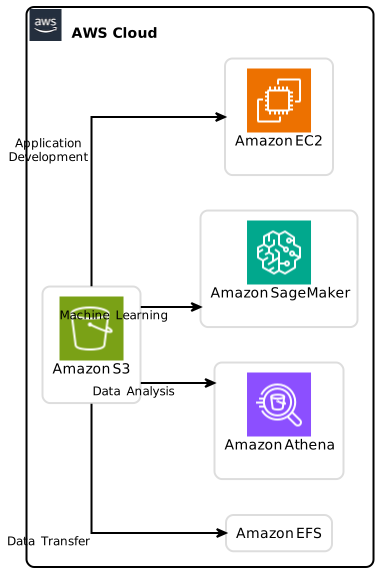
Once data is successfully transferred, utilizing it effectively is crucial. Here are a few services to consider:
1. Amazon S3 for Storage
Store your uploaded data securely and accessibly using Amazon S3.
2. Amazon Athena for Analysis
Quickly query large datasets stored in S3 without the need for complex ETL setups by using Amazon Athena.
3. Amazon SageMaker for ML
Utilize Amazon SageMaker for developing and deploying machine learning models based on your uploaded data.
4. Amazon EC2 for Development
Leverage Amazon EC2 instances for application development and testing using your new datasets.
Future Predictions for Data Migration Technologies
As cloud technologies continue to evolve, so will the methodologies for data migration. Here are some potential trends to watch for:
- Increased Adoption of AI: Machine learning technologies will likely play a significant role in optimizing how data is transferred and processed.
- Edge Computing: The growth of edge computing could lead to more efficient data transfer methods, reducing latency for real-time applications.
- Enhanced Security Protocols: Continuous advancements in security measures will become essential for data transfers, especially in sensitive industries.
Conclusion: Key Takeaways and Next Steps
The AWS Data Transfer Terminal is a game-changer for organizations looking to streamline their data migration processes. With a focus on speed, security, and integration with AWS services, it offers a robust solution for transferring large datasets.
Key Takeaways
- The new AWS Data Transfer Terminal in Munich enhances data transfer capabilities in Europe.
- The terminal supports numerous industries and applications, from automotive to media.
- Best practices such as data cleanup, encryption, and compliance are essential for secure transfers.
Call to Action
Ready to streamline your data transfer process with AWS? Visit the AWS Data Transfer Terminal product page to learn more and start your journey towards efficient data migration today!
In conclusion, whether you are a beginner or a seasoned expert, leveraging the AWS Data Transfer Terminal will set your data management processes on the right track for future growth and innovation. AWS Data Transfer Terminal.