
Introduction
Deploying complex systems like SAP NetWeaver can often be a daunting task, especially for teams lacking the expertise or tools to effectively manage this process. AWS Launch Wizard now supports deploying multi-node SAP NetWeaver applications on the SAP ASE database, simplifying what has traditionally been a complex deployment process. This guide aims to outline the intricacies of the deployment automation using AWS Launch Wizard, detailing its features, best practices, and technical requirements.
What is AWS Launch Wizard?
AWS Launch Wizard is an application that simplifies the provisioning of AWS resources for third-party applications, specifically targeting user-friendly deployment options for systems like SAP. This powerful tool allows you to size, configure, deploy, and scale AWS resources, taking the burden off developers and system architects who normally must manually configure each element of the infrastructure.
Features of AWS Launch Wizard
- Automated Deployment: Automates the entire deployment process of multi-node SAP systems, eliminating reliance on intricate manual setup.
- Guided Configuration: Provides a step-by-step wizard for configuring resources, making it accessible for users at various skill levels.
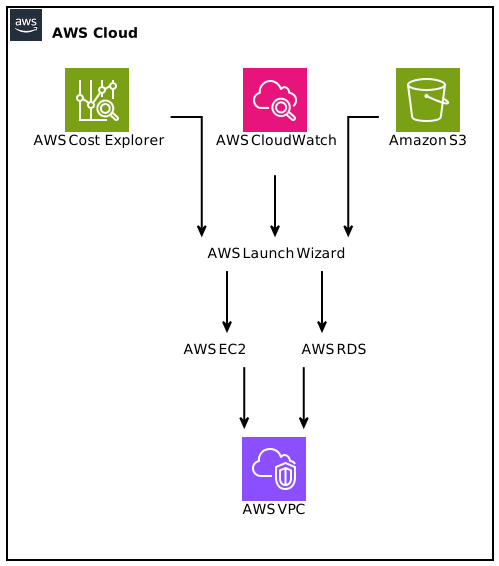
- Integration with AWS Services: Deep integration with core AWS services like EC2, RDS, and S3 ensures a robust deployment architecture.
- Support for Multiple Database Types: Has the capability to deploy not just on SAP ASE, but also supports configurations for HANA databases.
- Cost Estimation: Enables users to forecast costs associated with running SAP systems on AWS, facilitating budgetary alignment.
Benefits of Multi-Node Deployment for SAP NetWeaver
Deploying SAP NetWeaver in a multi-node pattern offers significant advantages in scalability, fault tolerance, and performance:
Scalability
Multi-node architecture allows organizations to easily scale their SAP applications horizontally. As demand grows, they can add more application servers without downtime, leading to enhanced performance and user experience.
Fault Tolerance
With multiple nodes in place, the failure of a single node can be mitigated through load balancing and clustering, ensuring a seamless experience for end-users.
Performance Optimization
Different EC2 instances can be optimized for specific workloads. For instance, the database component could be optimized for I/O, while application servers could be optimized for computational tasks.
Increased Flexibility
Deploying SAP on multiple EC2 instances allows IT teams to configure and allocate resources based on varying workload requirements, leading to better resource utilization.
How to Initiate the Deployment
Getting started with the deployment of multi-node SAP NetWeaver on SAP ASE using AWS Launch Wizard requires a few preparatory steps:
Prerequisites
- AWS Account: Ensure you have an active AWS account.
- IAM Permissions: You must have necessary permissions to create EC2 instances, RDS databases, and other AWS resources. An IAM role with administrative privileges is recommended for the setup process.
- Billing Information: Make sure you have billing enabled on your AWS account to avoid interruptions during deployment.
Launching the AWS Launch Wizard
- Access the Dashboard: Log in to your AWS Management Console and navigate to the AWS Launch Wizard.
- Select SAP Deployment: Choose the option for SAP Application deployment, and select “SAP NetWeaver on SAP ASE” as your desired stack.
- Input Configuration Parameters: The wizard will prompt you to input a variety of configuration parameters such as instance types, number of application servers, storage options, and networking settings.
- Review and Launch: Finally, review all settings, and click the launch button. AWS will begin provisioning resources, and this may take some time based on the configurations selected.
Understanding SAP NetWeaver and SAP ASE
Overview of SAP NetWeaver
SAP NetWeaver is an integrated technology platform that enables the development and connection of applications. It supports various business processes and enhances data flow across enterprises. SAP NetWeaver forms the backbone of many SAP solutions, including both analytical and transactional systems.
Overview of SAP ASE
SAP Adaptive Server Enterprise (ASE) is a high-performance database server optimized for running business-critical applications. Known for its reliability and resilience, ASE supports large data sets and delivers fast transaction processing capabilities, making it suitable for environments where performance and uptime are essential.
Technical Considerations for Deployment
When deploying SAP NetWeaver on SAP ASE using AWS Launch Wizard, numerous technical considerations must be taken into account:
Instance Types
Choosing the right EC2 instance types is vital for achieving optimal performance. The recommended instance types for SAP workloads generally fall under the following categories:
- General Purpose: T3 or M5 instances provide a balanced set of compute, memory, and networking resources.
- Compute Optimized: C5 instances can be beneficial for compute-heavy workloads such as application servers.
- Memory Optimized: R5 instances are recommended for memory-intensive tasks, particularly for the SAP ASE database.
Storage Options
AWS provides several storage options, and choosing the right type depends on the application’s requirements:
- EBS (Elastic Block Store): Offers both SSD-backed and HDD-backed storage options that are crucial for database persistence.
- Instance Store: Ideal for temporary storage needs but should not be relied upon for critical database storage as data is lost when instances are terminated.
Networking Configuration
AWS VPC (Virtual Private Cloud) settings are critical for network performance and security. Ensure that your application servers and database can communicate on low-latency networks, ideally within the same subnet. Network settings must also align with AWS security best practices, including the use of security groups and network ACLs.
High Availability
Employing Multi-AZ (Availability Zone) deployments for SAP ASE database increases fault tolerance. Data is automatically synchronized across zones, preventing downtime during planned maintenance or unexpected outages.
Monitoring and Management
AWS offers several tools for monitoring the health and performance of your deployed systems:
- Amazon CloudWatch: Provides metrics and logs, allowing you to set up alerts based on performance thresholds.
- AWS CloudTrail: Offers visibility into API usage and changes made to your AWS environment for compliance and auditing.
Best Practices for Deployment
To ensure a successful deployment of SAP NetWeaver on SAP ASE, consider the following best practices:
1. Plan Your Sizing
Before initiating the deployment, conduct load testing and performance analysis to determine the optimal sizing for your EC2 instances. Use SAP’s Quick Sizer tool for accurate estimations.
2. Implement Security Measures
Adopt a security-first approach by implementing policies around IAM roles, using SSL/TLS for data-in-transit encryption, and encrypting data-at-rest with AWS Key Management Service (KMS).
3. Optimize Backups
Establish a robust backup strategy using AWS Backup or native database backup features. Ensure regular snapshots of EBS volumes and database backups in case of future recovery needs.
4. Automate Scaling
Use AWS Auto Scaling to manage the number of running instances based on demand. This keeps costs predictable and ensures that application performance meets user expectations during peak usage times.
5. Involve DevOps
Incorporate DevOps best practices, such as Infrastructure as Code (IaC), to automate and control your deployment configurations. Use tools like AWS CloudFormation or Terraform to define and manage your AWS resources through code.
Monitoring and Optimization Post-Deployment
Once your SAP NetWeaver system is deployed, it’s important to continuously monitor and optimize its performance:
Performance Metrics to Monitor
- CPU Utilization: Keep an eye on CPU load to understand whether you need to upscale or downscale your instances.
- Memory Usage: Pay attention to memory consumption, especially in high-load scenarios.
- I/O Performance: Monitoring read/write IOPS can provide insights into how your database is handling transactions.
Regular Health Checks
Integrate regular health checks into your maintenance routine to ensure optimal performance. Automate these checks with CloudWatch alarms to alert your IT team to potential issues before they escalate.
Cost Management
Utilize AWS Cost Explorer to monitor expenditure trends. Understand your Reserved Instance options for long-term savings and adjust your scaling policies to optimize costs.
Conclusion
AWS Launch Wizard provides a streamlined approach to deploying multi-node SAP NetWeaver applications on the SAP ASE database. By leveraging this tool, organizations can significantly reduce the complexities often associated with SAP deployments while ensuring robust performance and availability. This guide has covered key aspects such as technical considerations, best practices, and ongoing management strategies. To maximize the benefits of your deployment, integrate continuous monitoring and optimization into your operational strategy.
By automating multi-node SAP NetWeaver deployment on SAP ASE database, AWS Launch Wizard profoundly simplifies managing SAP infrastructures in the cloud.
Focus Keyphrase: AWS Launch Wizard automates multi-node SAP NetWeaver deployment on SAP ASE Database