
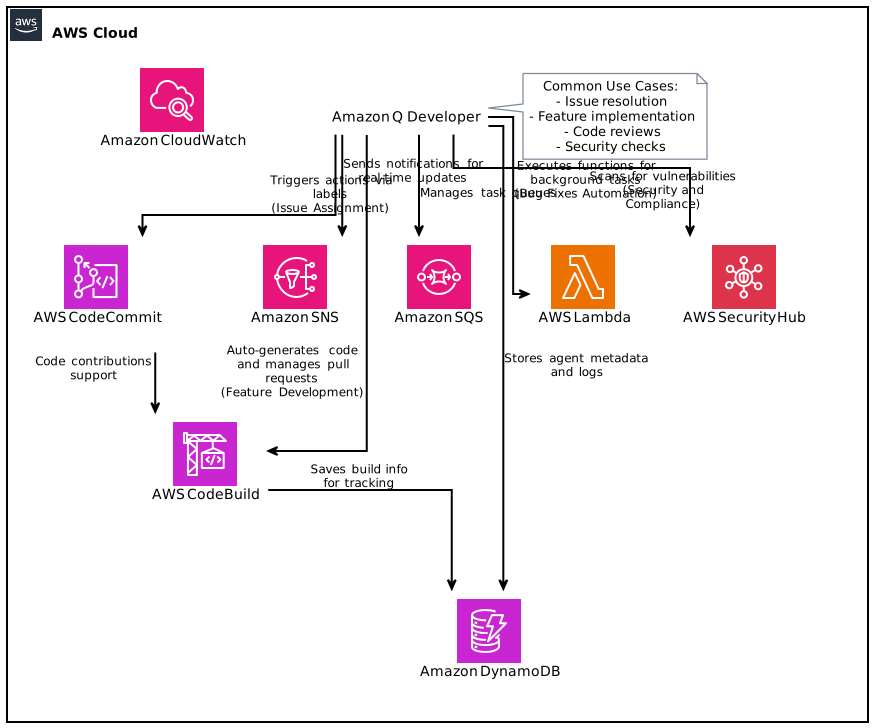
The Amazon Q Developer integration in GitHub (preview) is now available, launching new potential in software development through automation and machine learning. With the power of Amazon Q Developer agents at your disposal, you can streamline your development lifecycle, improving not only the speed but also the quality of your code. This guide will cover everything you need to know about this integration, from installation to advanced features, and how to utilize it effectively to enhance your development workflows in GitHub.
Table of Contents
- Introduction to Amazon Q Developer
- Overview of GitHub Integration
- Installing the Amazon Q Developer Integration
- Using Labels for Issue Assignment
- Feature Development with Amazon Q
- Bug Fixes Automation
- Code Reviews with Amazon Q
- Java Code Transformation
- Collaborative Development Experience
- Security and Compliance
- Common Use Cases
- Conclusion and Future Outlook
Introduction to Amazon Q Developer
Amazon Q Developer is AWS’s innovative tool designed to enhance the developer experience by leveraging AI and machine learning algorithms. By integrating with GitHub, it allows developers to automate routine tasks, thus freeing them to focus more on creative problem solving and advanced coding tasks. The Amazon Q Developer integration in GitHub (preview) facilitates feature development, real-time feedback on code changes, and automated legacy code modernization, making it a game changer for agile development teams.
Overview of GitHub Integration
GitHub stands as the largest platform for developers globally, creating a collaborative environment for project management and code sharing. With the introduction of Amazon Q Developer integration, GitHub becomes even more powerful. This feature enables:
- Automatic implementation of new features.
- Generation of bug fixes without manual intervention.
- Running comprehensive code reviews to ensure quality.
- Modernization of legacy Java applications.
All these capabilities enhance the developer experience, resulting in faster turnaround times and higher quality software.
Installing the Amazon Q Developer Integration
To get started with Amazon Q Developer on GitHub, follow these steps:
- Visit the GitHub Marketplace: Navigate to the GitHub marketplace and find the Amazon Q Developer application.
- Install the Application: Click on “Install it for free,” and follow the prompts to add the application to your repositories.
- Configuration: After installation, configure the integration according to your project’s needs. This may involve setting permissions, where you define what issues the agent can access and modify.
Once installed, you’ll be able to leverage Amazon Q Developer’s features directly within your GitHub environment.
Using Labels for Issue Assignment
One of the most powerful features of the Amazon Q Developer integration is the ability to use labels for issue assignment. By tagging issues with specific labels, developers can effectively route tasks to the Amazon Q Developer agent. Important steps include:
- Define Your Labels: Create labels such as “feature request,” “bug,” or “review needed” for better categorization.
- Assign Labels: When creating an issue, simply apply the necessary label.
- Automation Trigger: The application will automatically identify these labels and trigger appropriate actions, engaging the Q Developer agents to take over the development process.
This feature helps in better project organization and allows teams to execute their work more efficiently.
Feature Development with Amazon Q
Feature development is crucial in software development cycles. With Amazon Q Developer, developers can accelerate this process:
- Automatic Code Generation: Amazon Q Developer can create skeleton code for new features based on a predefined structure.
- Pull Request Workflows: As developers engage with Q Developer agents, it will utilize the existing pull request workflows, ensuring maintainability and adherence to coding standards.
- Refinement & Iteration: After initial implementation, developers can refine the code through Q Developer’s iterative responses based on team comments.
By automating these processes, the integration effectively reduces time-to-market for new features.
Bug Fixes Automation
Identifying and fixing bugs is often time-consuming. The Amazon Q Developer integration simplifies this affliction with automated bug fixing capabilities:
- Agent-Driven Bug Resolution: Once a bug is reported, Q Developer agents can analyze the codebase, identify the bug’s source, and generate a fix.
- Ensuring Quality: The generated fixes include automated testing sequences, ensuring the new code does not break existing functionality.
- Notification to Teams: Developers are notified when a bug fix is implemented, ensuring transparency and collaboration.
This ensures that software products maintain high levels of reliability while saving developers valuable time.
Code Reviews with Amazon Q
Code reviews are an essential aspect of ensuring code quality, and Amazon Q Developer enhances this process:
- Automation: The integration performs automatic code reviews on new pull requests, identifying potential issues or areas for improvement.
- Detailed Feedback: Q Developer provides suggestions and necessary adjustments in real-time, allowing developers to learn and grow through feedback.
- Streamlined Communication: With each review, developers can directly comment or ask for modifications, creating a seamless communication loop that enhances team cohesion.
This elevates the importance of code reviews from a periodic task to an ongoing, integral part of the development cycle.
Java Code Transformation
Legacy Java applications can be a bottleneck due to outdated libraries or inefficient code practices. Amazon Q Developer assists in the modernization of these applications:
- Assessment of Legacy Code: The integration assesses existing Java applications and identifies areas for improvement or modernization.
- Code Refactoring: Q Developer can refactor outdated code snippets, adhering to modern standards and best practices.
- Transformation Strategies: Through intelligent recommendations, developers receive guidance on transforming their codebases without losing functionality.
By applying these transformations, organizations can significantly extend the lifespan and performance of their Java applications.
Collaborative Development Experience
One of the standout features of the Amazon Q Developer integration in GitHub is its focus on facilitating collaboration:
- Real-Time Interactivity: Developers can interact with the Q Developer agents directly within GitHub comments, receiving immediate feedback and suggestions.
- Team Updates: Every change made by the agents can trigger notifications to team members, ensuring that every member is aware of code changes and enhancements.
- Collaboration Tools: Utilizing features like GitHub Projects and Issues, teams can organize their tasks more effectively, making collaborative efforts streamlined and productive.
This collaborative environment promotes team dynamics and fosters a culture of continuous improvement.
Security and Compliance
While introducing automation, security and compliance should remain a priority. The Amazon Q Developer integration takes the following measures:
- Code Scanning for Vulnerabilities: Automatically scans generated code for vulnerabilities or compliance issues, ensuring all outputs meet corporate and regulatory standards.
- Access Controls: Administrators can establish precise access controls within the GitHub repository settings concerning what the Amazon Q Developer can and cannot modify or access.
- Audit Trails: Full audit capabilities track changes made by the Q Developer, providing accountability and traceability.
Through these measures, organizations can maintain high security and compliance standards while leveraging automation.
Common Use Cases
The versatility of the Amazon Q Developer integration means it applies to various scenarios, including:
- Startups Developing MVPs: Quick iteration cycles with the development of features and fixing of bugs.
- Established Enterprises Updating Legacy Systems: Enhancing legacy Java applications without code freezes or major overhauls.
- Open Source Projects: Attracting contributions through easy onboarding for new developers, as Amazon Q can assist them with initial code contributions.
These use cases highlight Amazon Q Developer’s capacity to cater to diverse organizational needs, ultimately leading to greater productivity.
Conclusion and Future Outlook
The launch of Amazon Q Developer integration in GitHub is a leap forward in the developer experience, merging efficiency, collaboration, and security into a single framework. As it continues to develop and gain features during its preview phase, the integration promises to make software development faster, smarter, and more secure. Organizations should embrace this innovative tool to enhance their workflows and curb the challenges of modern software development.
The potential for this integration to evolve is vast; future iterations may include enhanced machine learning features, deeper integrations with AWS services, and expanded compatibility with other languages and frameworks, ensuring that teams remain agile and capable in a fast-paced environment.
Get started with the Amazon Q Developer integration in GitHub today and revolutionize your software development process while maintaining your quality standards.
Focus Keyphrase: Amazon Q Developer integration in GitHub