
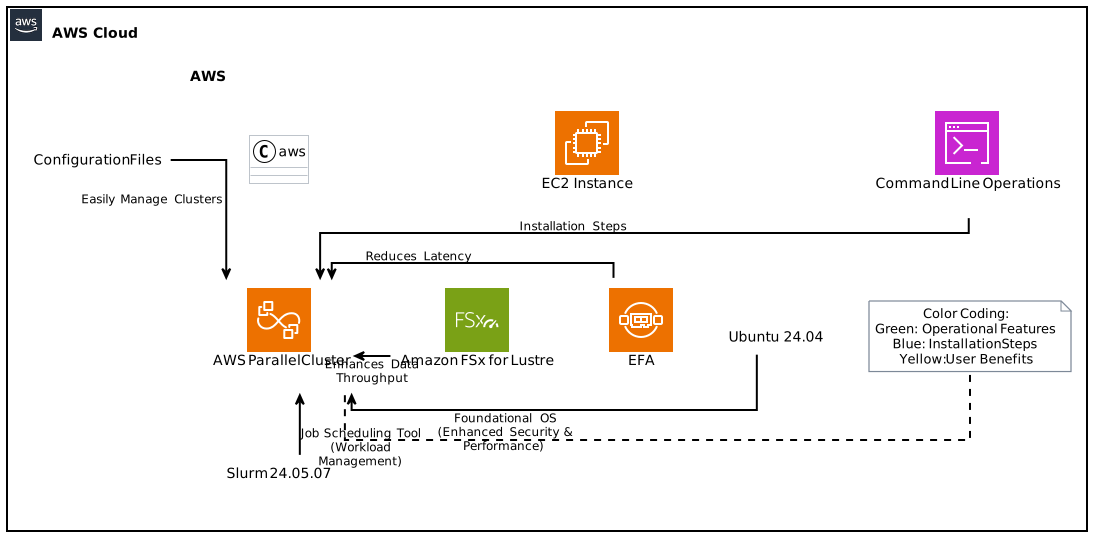
AWS ParallelCluster 3.13 brings exciting new features that enhance the user experience while optimizing high-performance computing (HPC) workloads. This guide outlines the latest capabilities in AWS ParallelCluster, especially its support for Ubuntu 24.04 and EFA-enabled Amazon FSx for Lustre. By the end of this article, you will have a comprehensive understanding of how these advancements can be leveraged to improve your HPC systems on AWS.
Introduction to AWS ParallelCluster
AWS ParallelCluster is an open-source tool designed to assist researchers and IT administrators in the setup and management of large-scale HPC clusters within the AWS cloud ecosystem. It simplifies the process by automatically provisioning necessary resources and software configurations. With every release, ParallelCluster aims to incorporate cutting-edge technology that benefits its users, and Version 3.13 is a significant step forward. The support for Ubuntu 24.04 and EFA-enabled FSx Lustre filesystems are key highlights that facilitate enhanced performance and efficiency.
Key Features of AWS ParallelCluster 3.13
1. Support for Ubuntu 24.04
As computers evolve, operating systems must adapt. With the release of Ubuntu 24.04, ParallelCluster provides users with a streamlined, updated, and reliable environment. This new version integrates improvements in system security, user interface, and compatibility with the latest software packages.
Key Benefits of Ubuntu 24.04:
- Enhanced Security: Ubuntu 24.04 incorporates the latest security patches and updates.
- Improved Performance: The operating system is optimized for better handling of memory and processing power, which is crucial for demanding HPC tasks.
- Long-Term Support (LTS): Ubuntu 24.04 is an LTS release, ensuring five years of support for updates and fixes.
2. Updated Slurm Version 24.05.07
Slurm is the open-source job scheduler that ParallelCluster utilizes to manage workloads across HPC clusters. The updated version 24.05.07 incorporates several enhancements that are worth mentioning:
- Job Scheduling Improvements: Enhanced algorithms for better job scheduling and resource allocation.
- User Experience Enhancements: Usability improvements which make it easier for users to manage and monitor their jobs.
- Support for New Features: Adds functionality to cope with changing workloads and complex applications more effectively.
3. EFA-Enabled Amazon FSx for Lustre
One of the most exciting features of ParallelCluster 3.13 is the support for Elastic Fabric Adapter (EFA)-enabled Amazon FSx for Lustre filesystems. EFA is a network interface that enables low-latency and high-throughput networking. Together with FSx for Lustre, this combination empowers users to achieve impressive performance for their HPC tasks.
Key Benefits of EFA and FSx Lustre:
- High Throughput: Optimized for data-intensive applications, enabling faster data processing and job completion.
- Reduced Latency: The low-latency network capabilities of EFA make it suitable for inter-node communication in large-scale distributed applications.
- Cost-Efficiency: By completing jobs faster and running efficiently, users can reduce costs associated with running HPC workloads on AWS.
Getting Started with AWS ParallelCluster 3.13
The initial step in leveraging the power of AWS ParallelCluster 3.13 is the installation and configuration process.
Installation of ParallelCluster
You can install AWS ParallelCluster through the AWS Command Line Interface (CLI) or the user interface (UI). It’s essential to ensure that you have the necessary permissions and that your AWS account is set up correctly.
Prerequisites: Ensure that you have Administrative access to your AWS account, and that the CLI is installed. You also need Python 3.7 or later.
Install ParallelCluster:
bash
pip install aws-parallelclusterConfiguration: After installation, you can configure ParallelCluster with the following command:
bash
pcluster configure
Creating Your First Cluster
Creating a cluster involves several steps. The new user guide provides a detailed tutorial, but here’s a concise breakdown:
Configuration File: Create a configuration file that describes your cluster, including node types, instance types, AMI, storage, and EFA settings.
Submit the Cluster Creation Command:
bash
pcluster create my-clusterConnect to Your Cluster: After the cluster is created, you can connect using SSH:
bash
ssh -iec2-user@
Enabling EFA with FSx for Lustre
To take full advantage of the ParallelCluster 3.13 features, you’ll want to enable EFA capabilities. The following steps outline the general process:
Update Your Configuration: In your configuration file, enable the EFA option.
yaml
efa: trueIntegrate with FSx for Lustre: You need to define an FSx Lustre filesystem in your cluster configuration.
yaml
head_node:
…
file_systems:- fsx:
…
- fsx:
Deploy the Cluster: Submit your updated configuration to create or update your cluster.
Run Benchmark Tests: Always validate the performance improvements by running benchmarks to ensure EFA is functioning as expected.
Managing Your HPC Workloads
AWS ParallelCluster not only offers a powerful means to create clusters but also ensures that managing those clusters is efficient and straightforward. The following subsections cover task scheduling, monitoring, and performance optimization within ParallelCluster.
Task Scheduling with Slurm
Slurm is the heart of the resource management within your cluster. Effective job scheduling ensures optimal use of resources.
Job Submission: Use
sbatchto submit jobs. You can add configurations for resources needed, e.g., number of nodes, time limit, etc.
bash
sbatch –nodes=2 –time=01:00:00 my_job_script.shJob Monitoring: Use
squeueto check the status of your jobs.
bash
squeue -u $USERJob Logs: Log files are automatically created for Slurm jobs, providing details that help in debugging problems.
Monitoring Cluster Performance
Keeping an eye on performance metrics is essential for optimizing your cluster’s workload:
CloudWatch Integration: AWS CloudWatch provides insight into metrics like CPU usage, memory consumption, and more. You can set up alarms to notify you when resources are under or over-utilized.
Node Health Checks: Regularly ensure that all nodes in your cluster are functioning correctly. You can use the
sinfocommand to quickly check node statuses.
Performance Optimization Tips
To maximize the performance of your ParallelCluster environment, consider these best practices:
Use Spot Instances: For non-time-sensitive jobs, utilize spot instances to reduce costs significantly.
Optimize Job Submission: Group smaller tasks into fewer, larger job submissions to minimize overhead.
Network Configuration: Ensure that your EFA settings are optimally configured for your workloads.
Data Locality: Try to keep the data needed for your job close to where the computations are being made to limit latency.
Real-world Applications of ParallelCluster
The flexibility and scalability of AWS ParallelCluster make it ideal for various applications across multiple fields. Let’s explore a few real-world scenarios where ParallelCluster has had significant impacts.
1. Scientific Research
Many scientific disciplines, such as genomics, materials science, and climate modeling, require large-scale computations. Researchers use ParallelCluster to quickly spin up clusters, run simulations, and analyze data without the overhead of maintaining physical infrastructure.
2. Machine Learning
Machine Learning (ML) practitioners can leverage AWS ParallelCluster for distributed training. By creating clusters with GPU instances and using EFA for fast data transfers, they can train complex models efficiently.
3. Financial Modeling
In finance, firms utilize HPC clusters to run risk simulations and predictive models. With AWS ParallelCluster, they can adjust the size of their clusters as needed to match workload demands — something traditional infrastructure setups struggle with.
Conclusion
AWS ParallelCluster 3.13 ushers in a new era for users looking to optimize their high-performance computing tasks on AWS. By offering support for Ubuntu 24.04, updated Slurm version 24.05.07, and integration with EFA-enabled Amazon FSx for Lustre, AWS has made it easier to create and manage efficient HPC clusters. Whether you are involved in scientific research, machine learning, or financial modeling, the power of ParallelCluster can significantly streamline your workflow, reduce costs, and enhance performance.
Embark on your AWS ParallelCluster journey today and maximize the potential of your high-performance computing tasks with the latest updates.
Focus Keyphrase: AWS ParallelCluster 3.13 with Ubuntu 24.04 and EFA-enabled FSx Lustre.