
Introduction
With the launch of Amazon Q Developer in Amazon SageMaker Canvas, a transformative tool for machine learning enthusiasts has emerged. No matter if you are a seasoned professional or a beginner, Amazon Q Developer provides an intuitive interface to swiftly build production-ready machine learning models using natural language instructions. This article will delve into the features and capabilities of Amazon Q Developer, its significant role in the machine learning lifecycle, and the technical nuances that make it an indispensable tool for data scientists.
Overview of Amazon Q Developer
What Is Amazon Q Developer?
Amazon Q Developer is Amazon’s generative AI capability that guides users through the intricacies of machine learning model development. It intelligently interprets natural language queries and facilitates various tasks ranging from data preprocessing to model evaluation and deployment. This capability has now transitioned from being a beta service to a general release, which means more users can leverage it for their machine learning projects.
Key Features and Improvements
Since its inception, Amazon Q Developer has evolved significantly. Here are some of the newly introduced features:
- Comprehensive Model Support: Users can now create regression, classification, and time-series models.
- Enhanced Data Analysis: Analyze datasets of up to 25,000 rows with statistical computations performed on dataset features.
- Customizable AutoML Configurations: Fine-tune model training settings to improve speed and accuracy based on specific project demands.
- Faster Response Times: Improved guidance throughout the machine learning lifecycle ensures a more efficient workflow.
Understanding the Machine Learning Lifecycle
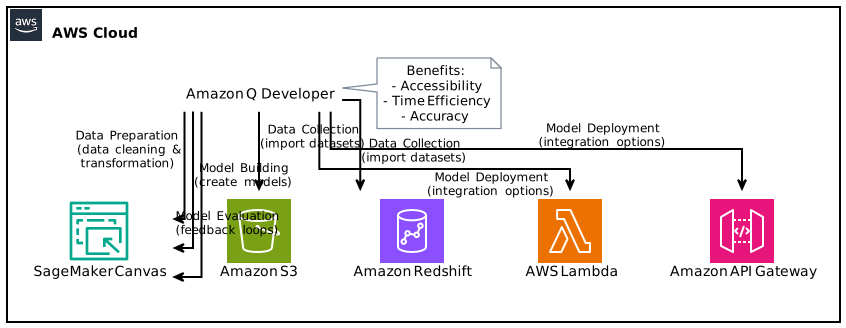
The machine learning lifecycle consists of various stages that require different tools and methodologies. The integration of Amazon Q Developer in this lifecycle will be discussed to highlight its impact.
1. Data Collection
The first step in ML involves gathering the right data. Amazon Q Developer integrates with various AWS data sources, making it easier to import datasets directly into SageMaker Canvas. The simplicity of this integration allows users to focus more on data quality rather than data procurement.
2. Data Preparation
Data Cleaning and Transformation
The quality of the models is directly tied to the quality of the data used. Amazon Q Developer facilitates the data preparation process by suggesting data cleaning techniques based on the dataset’s characteristics. Users can employ natural language queries like “Remove outliers” or “Normalize this dataset,” and Amazon Q Developer will offer helpful guidance.
3. Model Building
Amazon Q Developer shines brightly in the model building phase. Users can employ simple prompts to guide the model creation process. For instance, asking “Create a classification model” will leverage Amazon Q Developer’s capabilities to choose the right algorithms and configurations based on the user’s data.
Types of Models Supported
- Regression Models: Perfect for predicting continuous outcomes, such as sales trends.
- Classification Models: Use cases for this include classifying emails as spam or not.
- Time-Series Models: With the new capabilities, users can build models that forecast future values based on historical data trends, which is particularly useful for businesses looking to predict sales and resource needs.
4. Model Training
With the AutoML feature, users can easily adjust training parameters to suit their needs. For example, you can ask Amazon Q Developer to “Train a model with more emphasis on accuracy,” and it will automatically make the necessary adjustments.
5. Model Evaluation
Evaluating the performance of ML models is critical. Amazon Q Developer provides users with insights and metrics based on the created model. You can initiate evaluations through simple prompts like “Evaluate the model” and receive understandable feedback on its performance.
6. Model Deployment
Once the model meets your requirements, deploying it into a production environment is the final step. Amazon Q Developer streamlines this process by guiding users on best practices and offering deployments through AWS services such as Lambda or API Gateway.
Strategic Benefits of Using Amazon Q Developer
Accessibility Across Skill Levels
One of the foundational advantages of Amazon Q Developer is its ability to serve users at different skill levels. A data scientist may use more advanced features, while a business analyst can interact with the tool using natural language.
Time Efficiency
Machine learning projects can often take weeks or months, but with the assistance of Amazon Q Developer, users can expect a significant reduction in project timelines. The tool’s ability to analyze vast datasets, generate models quickly, and provide instant feedback accelerates the entire process.
Increased Accuracy
The enhancements in AutoML configurations mean that the models generated are not only faster but also more accurate. Users can expect a higher return on investment due to improved prediction capabilities.
How to Get Started with Amazon Q Developer in SageMaker Canvas
Prerequisites
To start using Amazon Q Developer, you’ll need:
– An AWS account.
– Access to Amazon SageMaker Canvas (available in specific AWS Regions).
– Familiarity with basic machine learning concepts.
Step-by-Step Guide
- Log into AWS Management Console: Navigate to the SageMaker service.
- Access SageMaker Canvas: Select the “Canvas” option listed.
- Choose Amazon Q Developer: Enable the Amazon Q Developer feature.
- Import Data: Use the built-in integration to pull datasets into the platform.
- Build Your Model: Start interactively creating your model by employing natural language commands.
- Train and Evaluate: Use the evaluation tools to fine-tune your model.
- Deploy the Model: Follow the deployment protocol as guided by Amazon Q Developer.
Technical Enhancements
Cloud Infrastructure
Amazon Q Developer operates on AWS’s robust cloud infrastructure, ensuring scalability, security, and high availability. The recent expansions into additional AWS regions, including:
– US East (Ohio)
– Asia Pacific (Mumbai)
– Asia Pacific (Singapore)
– Asia Pacific (Sydney)
– Europe (Ireland)
This growth provides users around the globe with the ability to leverage cutting-edge machine learning technologies without latency issues.
Integration with Other AWS Services
Amazon Q Developer’s integration with other AWS services such as Amazon S3 for data storage, Amazon Redshift for data warehousing, and Amazon QuickSight for data visualization offers a comprehensive ecosystem for advanced analytics.
Compliance and Security Features
AWS is renowned for its stringent compliance and security protocols. With features like data encryption, secure access controls, and compliance monitoring, users can rest assured that their data is safe while using Amazon Q Developer.
Use Cases for Amazon Q Developer
Retail Forecasting
Retailers can harness time-series models created with Amazon Q Developer to forecast product sales. By analyzing historical sales data, retailers can optimize their inventory and reduce costs.
Financial Services
Organizations in the financial sector can use regression models to predict stock prices or market trends, leading to better investment decisions and enhanced risk management.
Healthcare Analytics
Health organizations can build classification models to predict patient outcomes based on clinical data, allowing for improved patient care and optimized treatment plans.
Conclusion
Amazon Q Developer marks a significant advancement in the machine learning domain, empowering users across various industries to build robust models with relative ease. Its capabilities improve not only the machine learning lifecycle but also how teams can collaborate on data science projects. The commitment of Amazon to continually enhance this feature ensures that users will benefit from an increasingly sophisticated tool, which makes it essential for anyone looking to dive into the world of machine learning.
For more information on getting started with Amazon Q Developer, visit the official documentation or explore the Amazon SageMaker Canvas page.
Focus keyphrase: Amazon Q Developer in SageMaker Canvas