
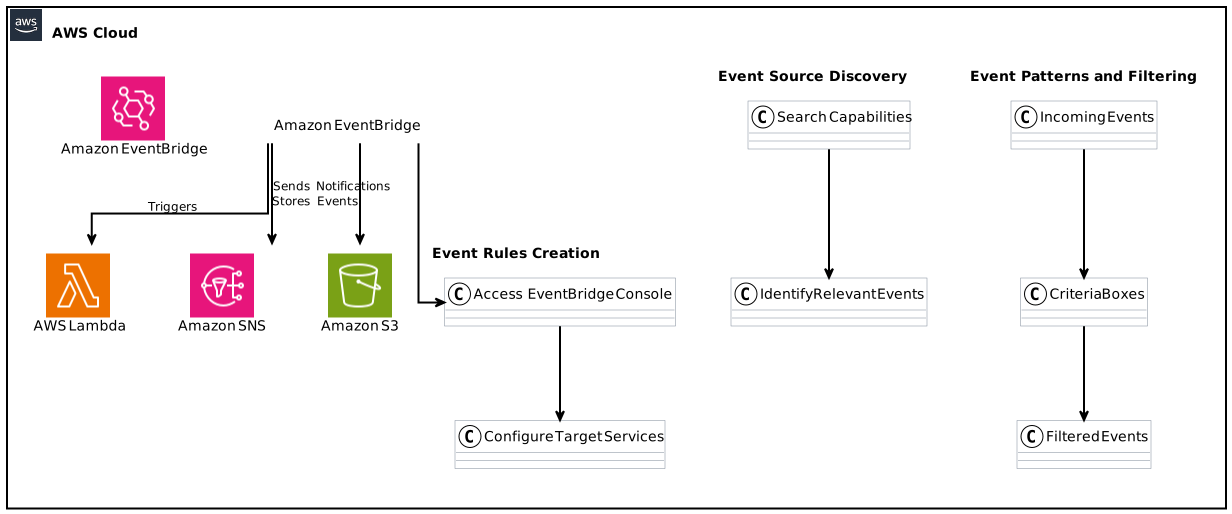
Amazon EventBridge has been a powerful tool for developers creating event-driven architectures, especially in a world increasingly reliant on real-time data processing and automation. As of January 31, 2025, significant enhancements have been introduced to the Amazon EventBridge console, allowing for improved event source discovery. This guide explores these features in depth, helping you to navigate and utilize the robust capabilities of EventBridge effectively.
Table of Contents
- Understanding Amazon EventBridge
- New Features in EventBridge Console
- Event Source Discovery
- Creating Event Rules
- Event Patterns and Filtering
- Integrating with AWS Services
- Utilizing the Updated Documentation
- Best Practices for Efficient Event Management
- Common Use Cases of EventBridge
- Conclusion
Understanding Amazon EventBridge
Amazon EventBridge is a serverless event bus that simplifies the process of connecting applications using events. It allows real-time data to flow seamlessly between distinct applications, services, and platforms, facilitating the creation of scalable event-driven applications.
Event-Driven Architectures
Event-driven architectures (EDA) are systems designed to respond to events, or changes in the state of an application. This approach offers greater agility, automatic scaling, and improved resource management, making it a favorite among modern applications deployed in cloud environments.
Benefits of Using EventBridge
- Scalability: Since EventBridge is serverless, users are free from the management burdens associated with maintaining infrastructure.
- Flexibility: Developers can create complex workflows by integrating various AWS services, third-party SaaS applications, and their own serverless applications.
- Reduced Complexity: EventBridge abstracts away many of the complexities involved in building event-driven systems.
New Features in the EventBridge Console
Amazon has introduced enhancements focusing on event source discovery within the EventBridge console, making it easier than ever for developers to find and use relevant AWS service events.
Enhanced Event Source Display
With the recent updates, the EventBridge console displays source and detail types for all available AWS service events when a rule is being created. This helps developers understand which events are accessible, allowing them to tailor their applications accurately.
Quick Search and Filter Capabilities
Developers can now quickly search for specific AWS service events and filter these events through the console. This capability allows users to concentrate on the events that are critical for their applications, saving time and reducing misconfigurations.
Event Source Discovery
How Event Source Discovery Works
Event source discovery is a fundamental aspect of leveraging EventBridge efficiently. By understanding how and where events originate, developers can build more effective event-driven applications.
- Automatic Updates: The EventBridge console has been linked to a dynamically updating list of AWS service events, ensuring developers always have access to current options.
- Simplified Access: The rich dashboard allows for a user-friendly method to navigate through complexities associated with event types and their respective sources.
Importance of Event Source Discovery
The ability to efficiently discover event sources can dramatically speed up the development process. Instead of searching through manual documentation, developers can leverage the console’s features, thus shifting their focus towards building application logic.
Creating Event Rules
Creating event rules in EventBridge plays a vital role in shaping how your applications respond to various triggers.
Step-by-Step Guide to Creating Event Rules
- Access the EventBridge Console: Navigate to the AWS Management Console and select EventBridge.
- Create a New Rule: Click the “Create Rule” button. This brings up comprehensive options for rule configuration.
- Define Rule Properties: Specify the name and description for the rule.
- Select an Event Source: Utilize the enhanced interface to select from the wide array of available AWS service events.
- Specify Target Services: Choose AWS services or custom applications that will react to the input events.
- Set Up Additional Configurations: Add any filters, transformation actions, or conditions for event processing.
Best Practices for Creating Rules
- Be Descriptive: Use precise names and descriptions for rules to clarify their purpose and functionality.
- Limit Permissions: Apply least privilege IAM roles to restrict what events can invoke your rules.
- Test Rigorously: Always test your rules in a non-production environment before launching them into production.
Event Patterns and Filtering
Understanding Event Patterns
Event patterns define the criteria that an incoming event must meet to trigger associated rules.
Building Effective Event Patterns
When creating event patterns, consider the following:
- Use JSON Schema to outline potential values when filtering events.
- Develop event patterns that are broad enough to catch necessary events, but specific enough to avoid unwanted triggers.
Filtering Events
The ability to filter incoming events to match your business logic is crucial for any event-driven application.
Integrating with AWS Services
Amazon EventBridge seamlessly integrates with a diverse range of AWS services. These integrations are critical as they can expand the capabilities of your applications significantly.
Common Integrations
- AWS Lambda: One of the most prominent use cases of EventBridge is in combination with AWS Lambda, allowing for automated serverless processing.
- Amazon SNS: Use EventBridge to forward events to Amazon SNS for broader notification systems.
- Amazon S3: Capture events related to data storage and invoke processing logic in real time.
- Third-Party SaaS Applications: EventBridge can also ingest events from various SaaS services, enabling a more cohesive event-driven architecture across platforms.
Utilizing the Updated Documentation
The updated EventBridge documentation is pivotal for developers who want to maintain their applications effectively and stay updated with Amazon’s enhancements.
Key Features of the Updated Documentation
- Automatically Updated Lists: Keep track of all AWS service events without manually searching through documentation.
- Detailed Descriptions: Understand each event’s function and potential use cases for efficient integration.
Best Practices for Efficient Event Management
Fundamental Principles
- Design for Failure: Always assume that event processing might misfire and implement robust error handling strategies.
- Monitor and Analyze Events: Use AWS CloudWatch for monitoring and analyzing events to visualize patterns and improve your architecture.
- Utilize SNS for Alerts: Setting up Simple Notification Service (SNS) alerts for event failures ensures timely responses to issues.
Security Considerations
Implement security best practices by using AWS Identity and Access Management (IAM) to limit permissions appropriately. This is critical in maintaining the security of the event-driven architecture in EventBridge.
Common Use Cases of EventBridge
- Microservices Communication: Facilitate real-time communication between microservices by orchestrating events through EventBridge.
- Event-Driven ETL: Utilize EventBridge to automate ETL processes as events in data sources occur.
- Automated Workflows: Build complex workflows by responding to event-driven triggers, often used in CI/CD pipelines.
Conclusion
The enhancements to Amazon EventBridge’s event source discovery capabilities mark a significant step toward making event-driven application development more accessible and efficient. Familiarizing yourself with these new features will not only streamline your workflow but also lead to better application performance.
Utilizing the enhanced EventBridge console functionality combined with best practices will enable you to maximize the potential of AWS service events and build resilient, scalable applications.
Focus Keyphrase: Amazon EventBridge event source discovery