
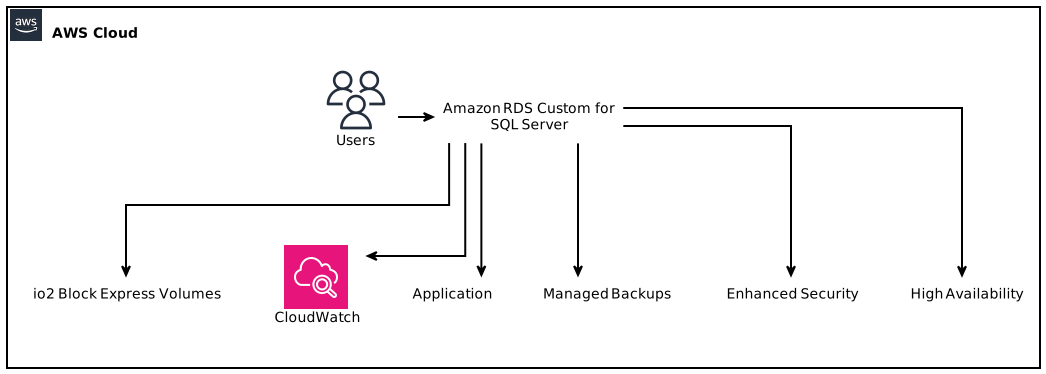
Amazon RDS Custom for SQL Server now supports an impressive 64TiB of storage and a staggering 256,000 IOPS using io2 Block Express volumes. This guide explores the revolutionary enhancements in performance and storage size, bringing flexibility to SQL Server database management in the cloud.
Introduction to Amazon RDS Custom and SQL Server
Amazon RDS Custom for SQL Server is a managed database service tailored to meet the unique requirements of users who demand more control and customization than what standard Amazon RDS offers. It integrates the powerful SQL Server engine while allowing users the flexibility to utilize their own licensed SQL Server media or opt for the SQL Server Developer Edition. One of the most compelling aspects of Amazon RDS Custom for SQL Server is its ability to scale significantly for use cases ranging from transactional databases to comprehensive data warehouses.
Why Choose Amazon RDS Custom for SQL Server?
With the introduction of the new support for 64TiB storage and 256,000 IOPS, many organizations are turning to RDS Custom for SQL Server. Here are several reasons why:
- Enhanced Performance: The uptick to 256,000 IOPS provides significant improvements for I/O-intensive applications, ensuring quick response times for queries.
- High Storage Limits: The support for up to 64TiB allows enterprises to store voluminous data without needing to architect complex data sharding or archiving strategies.
- Customization: The managed service allows specific customization at the OS level, catering to unique application demands.
- Cost-effective: As a managed service, RDS Custom reduces operational overhead by taking care of routine database tasks such as backups, patch management, and scaling.
Enhanced Storage and Performance Capabilities
Understanding io2 Block Express Volumes
Amazon’s io2 Block Express is an advanced storage class that significantly boosts performance. It is the next generation of EBS volumes, designed for workloads that require sustained high performance and consistency. Key features include:
- Durability and Availability: io2 Block Express volumes are built for high durability, offering 99.999% availability.
- Performance Scaling: Provides up to 64,000 IOPS per volume and the performance characteristics ramp up as you use additional volumes to achieve the desired results.
- Cost Efficiency: With the scalability of capacity and performance, it is generally more cost-effective for large workloads when compared to previous generations.
Implications of 64TiB Storage and 256,000 IOPS
The enhancement from the previous limit of 16TiB and 64,000 IOPS to 64TiB and 256,000 IOPS allows enterprises to:
– Handle Larger Databases: Organizations can manage large transactional databases and data warehouses on a single instance, reducing complexity and providing better performance.
– Increase Load Handling: The high IOPS capabilities facilitate real-time data processing and analytics, thus improving the overall user experience.
Getting Started with Amazon RDS Custom for SQL Server
To initiate using Amazon RDS Custom for SQL Server, follow these steps:
Step 1: Setup Your AWS Environment
- Ensure you have an AWS account.
- Navigate to the AWS Management Console.
Step 2: Launch an Amazon RDS Custom for SQL Server Instance
- Under the “RDS” section, select “Custom” and follow the wizard.
- Choose the version of SQL Server you want, along with the instance configuration.
Step 3: Configure Storage Options
- Select io2 Block Express volumes to utilize the new storage limits and IOPS capabilities.
- Specify the desired storage size (up to 64TiB) and configure IOPS.
Step 4: SQL Server Licensing
- Either use your existing SQL Server licenses or leverage the provided Developer Edition, streamlining your licensing requirements and reducing costs.
Step 5: Connect Your Application
- Once your instance is up and running, configure your application to connect to the RDS instance using the endpoint provided in the AWS console.
Step 6: Monitor Performance
- Use CloudWatch to set up monitoring for storage, IOPS, and other metrics to keep an eye on database performance.
Key Features of Amazon RDS Custom for SQL Server
Managed Backups
RDS Custom handles backups automatically. You can set retention periods and even perform point-in-time restores whenever necessary, ensuring data safety without manual intervention.
Enhanced Security
With built-in encryption for data at rest and in transit, as well as customizable security groups, your data remains protected. The added control at the OS level allows for implementing custom security measures based on organizational protocols.
Scalability
With the ability to adjust storage and IOPS on-demand, scaling your database as the business grows has never been easier. This agility supports various workloads while managing costs effectively.
High Availability
The service can be set up for Multi-AZ deployments, providing automatic failover support, should there be any issues with the primary instance.
Cost Management and Pricing Models
Understanding the pricing structure is critical for cost management when using Amazon RDS Custom for SQL Server. Here are key elements to consider:
Instance Pricing: Prices vary based on the instance type chosen. More powerful instances generally cater to workloads requiring higher IOPS and storage options.
Storage Costs: Consider the cost per GB for the io2 Block Express volumes. As storage increases up to 64TiB, be conscious of the potential for increasing costs.
I/O Requests: While RDS Custom allows high performance with 256,000 IOPS, you may want to assess the costs associated with exceeding baseline I/O requests.
Technical Considerations for Performance Optimization
Optimizing Database Configuration
Performance tuning SQL Server in the RDS environment requires attention to several aspects:
- Database Indexing: Properly indexing tables can greatly enhance query performance and overall speed.
- Choosing Correct Storage Options: Be mindful to use the right instance size and storage class as per workload requirements.
- Adjusting Connection Limits: Understanding the nature of application connections and tweaking the DB settings can ensure robust performance.
Query Performance Insights
Utilizing performance insights and query monitoring available in Amazon RDS can provide feedback on slow queries, allowing database administrators to focus optimization efforts where they are most needed.
Use Cases That Benefit from Amazon RDS Custom for SQL Server
E-Commerce
E-commerce platforms often deal with significant transactions. With a setup supporting 64TiB of storage and 256,000 IOPS, RDS Custom helps streamline order processing, inventory management, and customer data analytics.
Financial Services
In the world of finance, regulatory compliance and stringent performance standards are pivotal. RDS Custom’s high performance enables firms to run large transactional databases that are both responsive and secure.
Healthcare
As healthcare data management requires high availability with strict compliance standards, the enhanced scalability and performance of RDS Custom for SQL Server provides the required infrastructure for Electronic Health Records (EHR) systems.
Conclusion
Amazon RDS Custom for SQL Server is paving the way for organizations that need a robust, flexible, and high-performance database solution. With the ability to support up to 64TiB of storage and 256,000 IOPS with io2 Block Express volumes, businesses can focus on scaling their operations without worrying about underlying database management complexities. Whether you’re in e-commerce, financial services, or healthcare, the potential for enhanced performance and greater control makes adopting Amazon RDS Custom for SQL Server a strategic decision for any modern data-driven organization.
Focus Keyphrase: Amazon RDS Custom for SQL Server