
Introduction
On December 11, 2024, Amazon announced the launch of its latest offering: Amazon EC2 M8g instances powered by the advanced AWS Graviton4 processors, now available in the AWS Europe (Spain) region. These instances are designed to facilitate a range of general-purpose workloads while providing remarkable improvements in both performance and energy efficiency. In this comprehensive guide, we’ll delve into the various features of the M8g instances, compare them with previous generation instances, and discuss strategies for effectively leveraging these powerful resources in your cloud architecture.
What are Amazon EC2 M8g Instances?
Amazon EC2 M8g instances are versatile, general-purpose cloud computing resources that are well-suited for various applications ranging from simple web hosting to intensive data processing tasks. They are supported by the AWS Graviton4 processors and are part of the AWS Nitro System, which helps optimize the performance and security of cloud workloads.
Key Features of M8g Instances
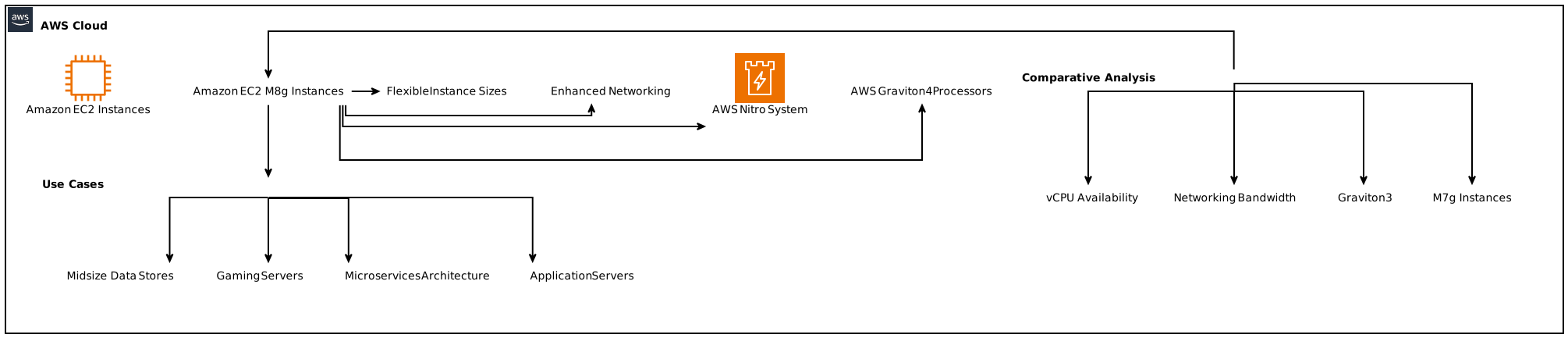
- AWS Graviton4 Processors: These instances utilize the latest generation of AWS Graviton processors, offering significant performance upgrades.
- Performance Improvements: Compared to AWS Graviton3-based instances, M8g instances exhibit a performance increase of up to 30%. This translates to faster processing for databases, web applications, and Java applications.
- Flexible Instance Sizes: With 12 different sizes available, including two bare metal options, users can select the instance that best fits their workload needs.
- Enhanced Networking and Storage: M8g instances feature up to 50 Gbps networking bandwidth and 40 Gbps bandwidth for Amazon Elastic Block Store (EBS), facilitating high-speed data transfers.
- Built on the AWS Nitro System: By offloading CPU virtualization, storage, and networking functions, the Nitro System enhances the overall performance and ensures greater security for your applications.
Benefits of Using Amazon EC2 M8g Instances
1. Enhanced Performance Across Workloads
AWS Graviton4 processors provide unparalleled speed and efficiency across various types of workloads. With up to 40% faster performance for databases, 30% faster for web applications, and 45% faster for large Java applications, the M8g instances allow organizations to scale their operations without worrying about performance bottlenecks.
2. Energy Efficiency
In addition to performance enhancements, M8g instances are designed with energy efficiency in mind. By optimizing resource utilization and leveraging more efficient processors, AWS allows organizations to minimize their carbon footprint while maintaining high levels of computational power.
3. Cost-Effective Solutions
With M8g instances, AWS aims to provide organizations with a cost-effective cloud solution. The improved performance-to-cost ratio ensures that businesses can achieve their computing objectives without incurring excessive expenses. Utilizing Graviton-based instances can lead to lower costs compared to traditional x86-based workloads.
Use Cases for Amazon EC2 M8g Instances
Amazon EC2 M8g instances are versatile and can be leveraged for a variety of applications, including but not limited to:
Application Servers
M8g instances can efficiently host application servers, providing the computational resources necessary for handling user requests, processing data, and serving content.
Microservices Architecture
Given their performance capabilities, M8g instances serve as an ideal choice for deploying microservices, allowing organizations to better manage application complexity and maintain scalability.
Gaming Servers
Cloud gaming is gaining popularity, and M8g instances provide the power and responsiveness needed for hosting online games in a scalable manner, enhancing player experience.
Midsize Data Stores
For businesses that require databases for medium-sized applications, M8g instances offer the necessary resources to store, retrieve, and manipulate data efficiently.
Caching Fleets
The speedy performance of M8g instances allows them to serve as caching layers for frequently accessed data, reducing latency and improving overall application responsiveness.
Technical Specifications of Amazon EC2 M8g Instances
M8g instances come with a range of configuration options to meet diverse needs. Here are some of the critical technical specifications:
Instance Sizes and Configuration
- 12 Different Instance Sizes: Adaptable configurations designed to meet the specific demands of diverse workloads.
- Up to 3x more vCPUs: Compared to Graviton3-based instances, M8g instances provide significantly enhanced vCPU availability.
Networking Capacity
- 50 Gbps Enhanced Networking: Ensures high throughput for network-intensive applications.
- 40 Gbps to Amazon EBS: Facilitating efficient data transfers between instances and storage for improved application performance.
Comparison: M8g Instances vs. Previous Generations
Graviton3 vs. Graviton4
The shift from Graviton3 to Graviton4 represents a monumental advancement in AWS’s computing capabilities. Here’s how they compare:
| Feature | Graviton3 | Graviton4 |
|—————————-|————————-|————————|
| Performance for Databases | N/A | Up to 40% faster |
| Performance for Web Apps | N/A | Up to 30% faster |
| Performance for Java Apps | N/A | Up to 45% faster |
| Enhanced Networking Bandwidth | 25 Gbps | 50 Gbps |
| Memory Options | Lower | More flexibility |
M7g vs. M8g Instances
Amazon EC2 instances underwent significant performance boosts with the M8g launch:
| Feature | M7g | M8g |
|—————————-|————————|————————|
| Max vCPUs | Lower | Up to 3x more |
| AWS Nitro System | Yes | Yes |
| Enhanced Networking | 25 Gbps | 50 Gbps |
Getting Started with Amazon EC2 M8g Instances
To effectively utilize Amazon EC2 M8g instances in your cloud infrastructure, follow the steps below.
Step 1: Access the AWS Management Console
Log in to your AWS account and navigate to the EC2 Dashboard.
Step 2: Select M8g Instances
When launching a new instance, select “M8g” from the instance type options to view the various available sizes.
Step 3: Configure Your Instance
Choose the necessary configurations for your instance, including vCPU count, memory size, and additional options like EBS settings.
Step 4: Networking and Security
Configure networking options to enable proper connectivity and security settings that comply with your organizational standards.
Step 5: Launch Your Instance
After configuring all settings, launch the instance and monitor its performance through the AWS Management Console.
Migrating to Amazon EC2 M8g Instances
For organizations looking to migrate workloads to Graviton-based instances, AWS provides several resources:
AWS Graviton Fast Start Program
This program offers guidance for quick onboarding onto Graviton-based instances. It includes best practices and specific tools tailored for migration.
Porting Advisor for Graviton
Utilize the Porting Advisor tool to evaluate your existing workloads and determine the suitability for migration to M8g instances. It highlights dependencies and potential challenges, helping to pave the way for a seamless transition.
Conclusion
The introduction of Amazon EC2 M8g instances in the AWS Europe (Spain) region marks an important milestone in cloud computing capabilities. These instances, powered by AWS Graviton4 processors, provide enhanced performance, energy efficiency, and flexibility to meet the requirements of modern workloads. By leveraging the benefits of M8g instances, organizations can achieve cost-effective, high-performance solutions tailored to their specific needs.
In summary, M8g instances are set to become an integral part of AWS’s offering, supporting a diverse range of applications across various industries. Organizations looking for improved performance and reduced costs should consider integrating Amazon EC2 M8g instances into their cloud strategies to stay ahead in today’s competitive landscape.
Focus Keyphrase: Amazon EC2 M8g Instances