
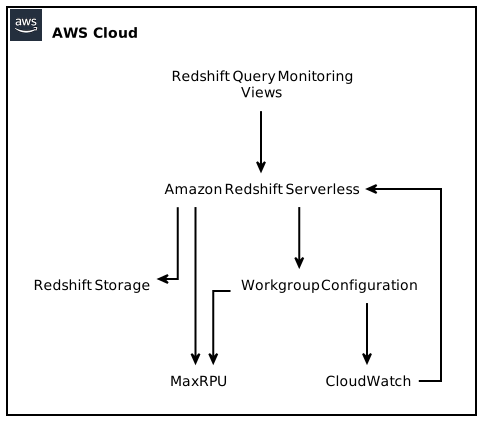
Amazon Redshift is a powerful data warehousing solution that offers users the ability to analyze vast amounts of data quickly and efficiently. With its serverless architecture, Redshift Serverless provides users with the convenience of automated scaling and reduced management overhead. To further enhance the cost predictability and control for Redshift Serverless customers, Amazon has introduced a new compute cost control setting called MaxRPU (Maximum Redshift Processing Units). In this guide, we will explore the features and benefits of MaxRPU, as well as delve into the technical details and considerations for implementing and optimizing this setting in your Redshift Serverless workloads.
Table of Contents
- Introduction
- What is Redshift Serverless?
- Understanding MaxRPU
- Benefits of MaxRPU
- How to Set MaxRPU
- Implementing MaxRPU in Redshift Serverless Workloads
- Considerations for MaxRPU Usage
- Cost Optimization
- Performance Trade-offs
- Monitoring and Alerting
- Best Practices for MaxRPU Usage
- Conclusion
Introduction
Amazon Redshift has always been at the forefront of providing cost-effective and reliable data warehousing solutions. With the introduction of Redshift Serverless, Amazon aims to offer users even more flexibility and control over their data processing workloads. The addition of MaxRPU takes this control a step further by allowing users to set upper limits on compute resources, providing enhanced predictability of compute costs.
What is Redshift Serverless?
Redshift Serverless is a variant of Amazon Redshift that provides on-demand scaling capabilities without the need for manual provisioning or management of compute resources. It allows users to focus on analyzing their data without worrying about the infrastructure. With Redshift Serverless, you pay only for the compute resources used during query execution and data loading, eliminating the need for continuous capacity management.
Understanding MaxRPU
MaxRPU is a new compute cost control setting introduced by Amazon Redshift for Redshift Serverless customers. It allows users to define an upper limit on the compute resources that Redshift Serverless can utilize at any given point in time. By setting the MaxRPU limit, users can ensure that their compute costs stay within specific boundaries, providing better cost predictability.
Benefits of MaxRPU
The introduction of MaxRPU in Redshift Serverless offers several benefits to users, including:
Improved Cost Control: With MaxRPU, users have the ability to limit compute usage at different points in time, providing better cost predictability. This allows users to set realistic budget limits and avoid unexpected cost overruns.
Enhanced Flexibility: By setting MaxRPU limits, users can adjust compute resources to match their specific workload requirements. This provides the freedom to allocate resources where they are needed the most and optimize costs accordingly.
Simplified Monitoring and Alerting: Redshift Serverless automatically logs any exceedances of the MaxRPU limit to a system table, allowing users to track and monitor their resource utilization. Additionally, users can configure alerts to receive notifications when the MaxRPU limit is reached or exceeded.
Automatic Query Management: When the MaxRPU limit is reached, Redshift Serverless can automatically turn off user queries to prevent resource exhaustion. This ensures that critical workloads are prioritized and allows for efficient resource allocation.
How to Set MaxRPU
Setting the MaxRPU limit for your Redshift Serverless workgroup is a straightforward process. You can use the Amazon Redshift management console, AWS CLI, or API to configure the MaxRPU limit. The MaxRPU value represents the maximum number of Redshift Processing Units that your workgroup can utilize at any given time. By default, the MaxRPU limit is set to the workgroup’s maximum concurrency scaling level.
Implementing MaxRPU in Redshift Serverless Workloads
To effectively implement MaxRPU in your Redshift Serverless workloads, it is important to consider various factors and best practices. Here are some points to keep in mind:
Cost Optimization
- Analyze query patterns: Understand the nature of your workload and identify queries that may benefit from higher compute resources. Fine-tune the MaxRPU limit accordingly to optimize costs while minimizing query execution time.
- Utilize data caching: Leverage Redshift Spectrum caching to reduce the need for repeated compute-intensive operations. By caching frequently accessed data, you can potentially lower the MaxRPU limit without impacting performance.
- Use workload management: Implement query priorities and resource queues using workload management features provided by Redshift Serverless. This helps in prioritizing critical workloads while restricting resource usage for less important queries.
Performance Trade-offs
- Fine-tune MaxRPU limit: It is important to strike the right balance between cost optimization and performance. A higher MaxRPU limit may improve query execution time but can increase costs. Continuously monitor query performance and adjust the MaxRPU limit accordingly to achieve an optimal balance.
- Understand concurrency scaling behavior: Redshift Serverless’s concurrency scaling feature automatically scales compute resources based on workload demand. Keep in mind that concurrency scaling may impact your MaxRPU limit usage and adjust accordingly to maintain desired performance levels.
Monitoring and Alerting
- Set up CloudWatch alarms: Configure CloudWatch alarms to monitor key performance metrics, such as total RPU usage and MaxRPU limit exceedances. This ensures that you are promptly notified of any potential issues or cost overruns.
- Utilize Redshift Query Monitoring Views: Leverage Redshift’s Query Monitoring Views to gain insights into query performance, resource consumption, and MaxRPU limit utilization. Use this information to optimize query execution and MaxRPU setting for better performance and cost control.
Best Practices for MaxRPU Usage
To make the most out of the MaxRPU setting in Redshift Serverless, consider the following best practices:
- Continuously monitor and analyze query performance and resource utilization.
- Regularly review and adjust the MaxRPU limit based on workload patterns and resource requirements.
- Utilize workload management features to prioritize critical queries and manage resource allocation.
- Leverage Redshift Spectrum caching to reduce compute-intensive operations and lower MaxRPU limits.
- Fine-tune MaxRPU settings for optimal balance between performance and cost.
- Configure CloudWatch alarms and utilize Redshift Query Monitoring Views for effective monitoring and troubleshooting.
Conclusion
The introduction of MaxRPU in Amazon Redshift’s Serverless offering provides customers with enhanced cost predictability and control over compute resources. By setting upper limits on compute usage, Redshift Serverless users can optimize costs, improve query performance, and allocate resources more effectively. By following the best practices outlined in this guide, users can harness the full potential of MaxRPU to achieve better cost control and overall performance in their Redshift Serverless workloads.